Published:
Tagged: Ruby-on-Rails Passkeys WebAuthn Security Authentication
Building passkeys in Ruby on Rails
This is the second half of a two-part series. Part one covers where passkeys sit in the authentication landscape, what a passkey actually is, and the two ceremonies at the heart of WebAuthn. Here we turn those ceremonies into working code.
If you would rather not hand-roll any of it, a small gem further down packages this exact approach, but building it once first is the best way to understand what that gem is doing for you.
- What we’re building
- The parts a from-scratch demo skips
- A gem that packages this
- Where this leaves us
- References
What we’re building
We’ll build this from scratch: no Devise, no authentication engine, just the webauthn-ruby gem1 for the server-side cryptography and the browser’s native API on the front end. The goal is transparency rather than a drop-in solution, so the snippets below are the load-bearing parts rather than a complete application. We’re building passwordless, usernameless sign-in, which means discoverable credentials throughout.
1. A new Rails app
Start from an empty application. Any recent version will do; these examples target Rails 8. We pass --css=tailwind so the handful of views at the end get some styling without any custom CSS.
rails new passkeys_demo --css=tailwind
cd passkeys_demo
2. The user model
We need a User for credentials to hang off. In a usernameless flow the only field that truly matters is a stable identifier, but an email gives us something human to show when a user manages their keys. We add the webauthn_id column now too: it’s the user handle the authenticator stores alongside a discoverable credential, and the piece that later lets the server tell who is signing in without a typed username.
bin/rails generate model User email:string:uniq webauthn_id:string
bin/rails db:migrate
With the app and the User in place, we can add WebAuthn itself.
3. Setup
Add the gem and configure it. The configuration tells the library who you are and which origins it should trust.
# Gemfile
gem "webauthn"
# config/initializers/webauthn.rb
WebAuthn.configure do |config|
  config.allowed_origins = ["https://your.domain.dev"]
  config.rp_name = "Your Domain"
  # rp_id defaults to the origin's domain; set it explicitly if you
  # serve auth from a subdomain but want credentials to cover the apex.
  config.rp_id = "your.domain.dev"
end
A quick note on the browser side before the controllers. WebAuthn passes binary data, and JSON can’t carry raw bytes, so challenges and IDs travel as base64url strings that the browser has to turn into ArrayBuffers and back. Modern browsers handle that conversion for us: PublicKeyCredential.parseCreationOptionsFromJSON() and parseRequestOptionsFromJSON() turn the server’s JSON into the structures the API expects, and a credential’s .toJSON() turns the result back into something we can POST. These methods are now supported in every major browser2, so we use them directly and add no JavaScript dependency at all. (Until recently you needed a small helper such as @github/webauthn-json to fill this gap.)
4. The credential model
We need somewhere to keep the public keys. A user has many credentials, because a person will register more than one device, and each credential stores three things: the credential’s own identifier, the public key, and a signature counter. Generate the model the same way we did the user:
bin/rails generate model Credential \
  user:references \
  external_id:string:uniq \
  public_key:text \
  sign_count:integer \
  nickname:string
The generator gets us most of the way: user:references adds the foreign key, and external_id:string:uniq adds a unique index. We ask for sign_count:integer because the generator doesn’t accept bigint as a field type; we widen it to bigint in the migration below. Open the migration it wrote and tighten the columns that must always be present, plus a default for the counter:
# db/migrate/XXXXXX_create_credentials.rb
create_table :credentials do |t|
  t.references :user, null: false, foreign_key: true
  t.string  :external_id, null: false   # the credential ID, base64url
  t.text    :public_key,  null: false   # COSE key, base64url
  t.bigint  :sign_count,  null: false, default: 0
  t.string  :nickname                   # "Work laptop", so users can manage keys
  t.timestamps
end
add_index :credentials, :external_id, unique: true
Then run:
bin/rails db:migrate
The public key is a text column rather than a string: an RSA authenticator’s key, base64url-encoded, overflows the default varchar(255) on MySQL and would be truncated, breaking every later signature check for that credential.
We call this column external_id, deliberately not webauthn_id, to keep it distinct from the user handle we added to User earlier: the two are otherwise easy to confuse. The handle identifies the person, the credential ID identifies one key they registered. The handle needs a value once, when the account is created, and it should never expose anything sensitive.
# When creating a user:
user.update!(webauthn_id: WebAuthn.generate_user_id)
5. Linking users to credentials
The generated Credential already belongs_to :user; add the other side so current_user.credentials works:
# app/models/user.rb
class User < ApplicationRecord
  has_many :credentials, dependent: :destroy
end
6. Registration on the server
A reminder of the ceremony we’re now writing, server half on the right:
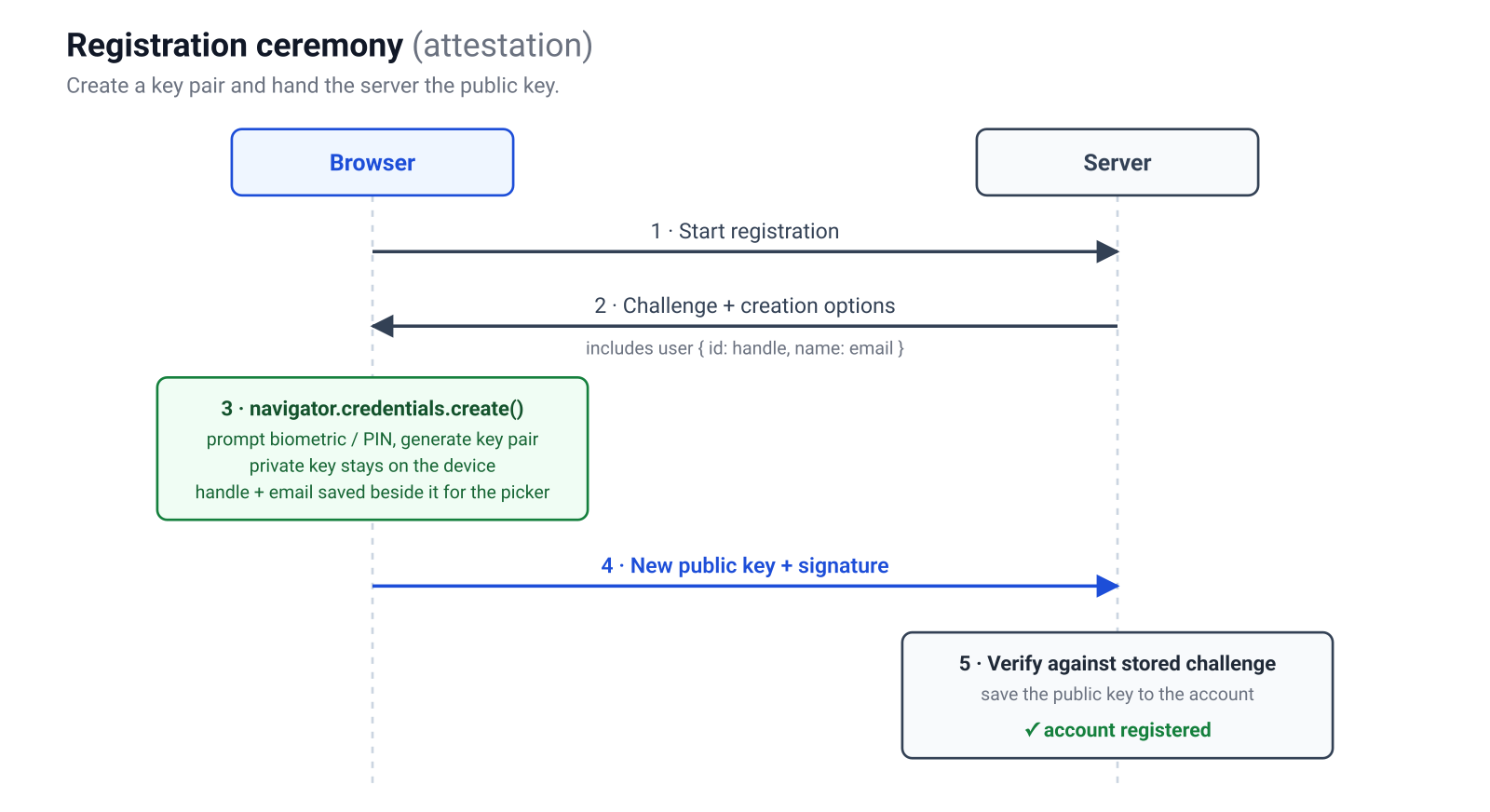
Both halves live in a RegistrationsController, so generate it first:
bin/rails generate controller Registrations
Starting registration means generating options, with two settings that turn an ordinary credential into a passkey. Requiring a resident key asks the authenticator to store a discoverable credential, and requiring user verification asks for the biometric or PIN gesture that makes the result multi-factor.
# app/controllers/registrations_controller.rb
class RegistrationsController < ApplicationController
  # POST /registration/options
  def options
    options = WebAuthn::Credential.options_for_create(
      user: { id: current_user.webauthn_id, name: current_user.email },
      exclude: current_user.credentials.pluck(:external_id),
      authenticator_selection: {
        resident_key: "required",
        user_verification: "required"
      }
    )

    session[:creation_challenge] = options.challenge
    render json: options
  end
end
The current_user here is the ordinary Rails session helper, nothing WebAuthn-specific: registering a passkey assumes the person is already signed in, so this endpoint runs for an authenticated user adding a key to their account. We define current_user (and the start_session_for used later) in step 11, next to the sign-up that bootstraps that first account.
The exclude list stops a user registering the same authenticator twice. Notice that the challenge is stashed in the session: it must survive the round-trip so we can confirm the device signed our challenge and not a replayed one.
The other action in the same controller verifies the result. The browser posts back the new credential, and the gem checks the signature and the challenge for us. If verify doesn’t raise, we persist the public key.
# app/controllers/registrations_controller.rb (same controller)
# POST /registration
def create
  webauthn_credential = WebAuthn::Credential.from_create(params[:credential])

  webauthn_credential.verify(
    session.delete(:creation_challenge),
    user_verification: true
  )

  current_user.credentials.create!(
    external_id: webauthn_credential.id,
    public_key:  webauthn_credential.public_key,
    sign_count:  webauthn_credential.sign_count,
    nickname:    params[:nickname]
  )

  render json: { status: "ok" }
rescue WebAuthn::Error => e
  render json: { error: e.message }, status: :unprocessable_entity
end
Deleting the challenge from the session as we read it’s deliberate: a challenge is single-use, and leaving it lying around invites replay.
That user_verification: true argument earns its place. Requiring user verification in the options only asks the browser for the gesture; it’s the verify call that actually checks the User-Verified flag the authenticator returns. Leave it off and a tampered client can skip the biometric and still be accepted, quietly demoting your multi-factor login to a single factor. The same argument belongs on the authentication verify below.
7. Registration in the browser
The front end fetches the options, turns them into the binary structures the API expects with PublicKeyCredential.parseCreationOptionsFromJSON(), hands those to navigator.credentials.create(), and posts the result back, serialised with the credential’s own .toJSON(). It lives in a small browser module, app/javascript/passkeys.js, and is exported so the views can import it later:
// app/javascript/passkeys.js
function csrfToken() {
  return document.querySelector('meta[name="csrf-token"]').content;
}

export async function registerPasskey(nickname) {
  const optionsJSON = await (await fetch("/registration/options", {
    method: "POST",
    headers: { "X-CSRF-Token": csrfToken() },
  })).json();

  // Turn the server's JSON into the binary structures the API expects.
  const options = PublicKeyCredential.parseCreationOptionsFromJSON(optionsJSON);

  // This line is where the OS prompts for Touch ID / Windows Hello / a PIN
  // and the key pair is generated inside the secure hardware.
  const credential = await navigator.credentials.create({ publicKey: options });

  await fetch("/registration", {
    method: "POST",
    headers: { "Content-Type": "application/json", "X-CSRF-Token": csrfToken() },
    body: JSON.stringify({ credential: credential.toJSON(), nickname }),
  });
}
Every fetch carries Rails’s CSRF token in the X-CSRF-Token header, read from the <meta name="csrf-token"> tag that csrf_meta_tags renders in the default layout. Leave it out and Rails rejects each POST with 422 Unprocessable Content (Can't verify CSRF token authenticity), so no ceremony ever runs.
The single most important line is the call to create(). That’s the moment the operating system takes over, asks the user for their gesture, and mints a key pair whose private half never becomes visible to your JavaScript, your server, or the network.
8. Authentication on the server
The mirror-image ceremony, once more before we implement it:
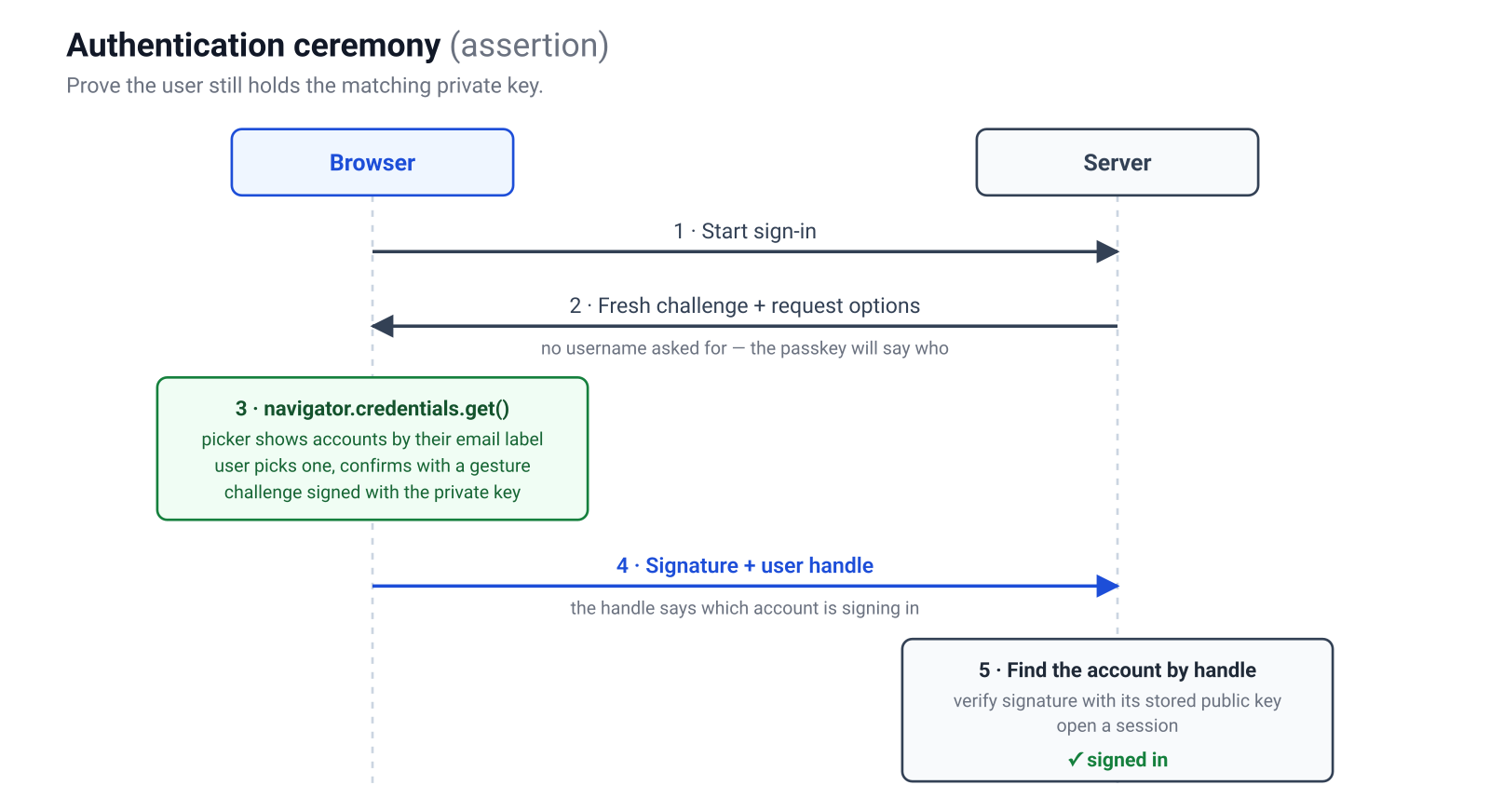
Sign-in gets its own SessionsController, so generate that too:
bin/rails generate controller Sessions
Now the symmetry pays off. To begin sign-in we generate options again, but this time we deliberately send no allow-list. An empty allow-list tells the browser to offer whatever discoverable passkeys it holds for this site, which is what produces the usernameless “pick an account” prompt.
# app/controllers/sessions_controller.rb
class SessionsController < ApplicationController
  # POST /session/options
  def options
    options = WebAuthn::Credential.options_for_get(
      user_verification: "required"
    )

    session[:authentication_challenge] = options.challenge
    render json: options
  end
end
When the signed assertion comes back, it carries two useful things: the credential’s ID, and the user handle we stored at registration. The handle tells us which user is signing in, with no username typed anywhere. The create action, in the same controller, does the verifying.
# app/controllers/sessions_controller.rb (same controller)
# POST /session
def create
  webauthn_credential = WebAuthn::Credential.from_get(params[:credential])

  user = User.find_by!(webauthn_id: webauthn_credential.user_handle)
  stored = user.credentials.find_by!(external_id: webauthn_credential.id)

  webauthn_credential.verify(
    session.delete(:authentication_challenge),
    public_key:  stored.public_key,
    sign_count:  stored.sign_count,
    user_verification: true
  )

  stored.update!(sign_count: webauthn_credential.sign_count)
  start_session_for(user)

  render json: { status: "ok" }
rescue WebAuthn::Error, ActiveRecord::RecordNotFound
  render json: { error: "Authentication failed" }, status: :unauthorized
end
The verify call is the heart of the whole system. It confirms the signature was produced by the private key matching our stored public key, that it covered our challenge, and that the origin the browser reported is one we allow. Only when all of that holds do we open a session.
The sign_count deserves a word. Each authenticator keeps a counter that it increments on every signature, and by storing the last value we have seen we can spot a counter that goes backwards, which would suggest a cloned device. Because we pass sign_count to verify, the gem enforces this for us automatically: it raises WebAuthn::SignCountVerificationError whenever a previously non-zero counter fails to strictly increase, the classic cloned-authenticator signal. Synced passkeys, the iCloud and Google variety, frequently report zero on both sides and are exempt, so they never trip it; the only way to opt out entirely is to pass sign_count: 0 every time, which can never regress.
9. Authentication in the browser
The front end mirrors registration. No username field appears anywhere. The sign-in half goes in the same app/javascript/passkeys.js module:
// app/javascript/passkeys.js (same csrfToken helper as above)
export async function signIn() {
  const optionsJSON = await (await fetch("/session/options", {
    method: "POST",
    headers: { "X-CSRF-Token": csrfToken() },
  })).json();
  const options = PublicKeyCredential.parseRequestOptionsFromJSON(optionsJSON);

  // The browser shows the account picker and asks for the user's gesture.
  const assertion = await navigator.credentials.get({ publicKey: options });

  const result = await fetch("/session", {
    method: "POST",
    headers: { "Content-Type": "application/json", "X-CSRF-Token": csrfToken() },
    body: JSON.stringify({ credential: assertion.toJSON() }),
  });

  if (result.ok) window.location.assign("/dashboard");
}
That’s a complete passwordless login. There’s no password field, no one-time code, no email round-trip, and nothing on the server that a breach could turn into account access.
10. Routes
So far we have controllers and two JavaScript functions but no pages to click. Three small views turn them into a working app, and because we created the project with --css=tailwind, a few utility classes give us something tidy without writing any CSS. The two functions from steps 7 and 9 already live in app/javascript/passkeys.js and are exported, so the views can import them.
Rails 8 wires JavaScript through import maps, and a file at the top of app/javascript isn’t pinned automatically, so add one line to config/importmap.rb; otherwise import { … } from "passkeys" fails to resolve in the browser and the buttons do nothing:
# config/importmap.rb
pin "passkeys"
The routes tie the endpoints and pages together:
# config/routes.rb
Rails.application.routes.draw do
  root "sessions#new"

  get  "signup",               to: "registrations#new"
  post "users",                to: "users#create"          # bootstrap the account
  post "registration/options", to: "registrations#options"
  post "registration",         to: "registrations#create"

  get  "signin",               to: "sessions#new"
  post "session/options",      to: "sessions#options"
  post "session",              to: "sessions#create"

  get  "dashboard",            to: "dashboard#show"
end
11. The application controller
A passwordless site still has to create the very first account somehow, the bootstrap problem the next section returns to. There’s no password anywhere in this chain. Being signed in just means session[:user_id] is set, and only two things ever set it. For a brand-new user, account creation does: submitting an email runs UsersController#create, which creates the User and opens a session on the spot. Now that current_user exists, the registration ceremony from step 7 can bind their first passkey to that account. From then on the other path takes over: signing in with that passkey verifies a signature and calls the same start_session_for, opening a session with no password and no account-creation step. So the full chain for a new user is sign up → session opened → first passkey registered, and every visit after that’s pick passkey → signature verified → session opened. The current_user and start_session_for helpers the earlier controllers assumed go in ApplicationController, which rails new already created, so we just add them:
# app/controllers/application_controller.rb
class ApplicationController < ActionController::Base
  private

  def current_user
    @current_user ||= User.find_by(id: session[:user_id])
  end

  def start_session_for(user)
    session[:user_id] = user.id
  end
end
12. The users controller
Generate the controller that creates accounts:
bin/rails generate controller Users
# app/controllers/users_controller.rb
class UsersController < ApplicationController
  def create
    user = User.create!(email: params[:email], webauthn_id: WebAuthn.generate_user_id)
    start_session_for(user)
    render json: { status: "ok" }
  end
end
The sign-up page takes an email, creates the account, then runs the registration ceremony from step 7:
<%# app/views/registrations/new.html.erb %>
<div class="min-h-screen flex items-center justify-center bg-slate-50">
<div class="w-full max-w-sm rounded-xl bg-white p-8 shadow">
<h1 class="text-xl font-semibold text-slate-800">Create your account</h1>
<input id="email" type="email" placeholder="you@example.com"
class="mt-4 w-full rounded-lg border border-slate-300 px-3 py-2">
<button id="signup"
class="mt-4 w-full rounded-lg bg-teal-600 px-3 py-2 font-medium text-white hover:bg-teal-700">
Create account & add passkey
</button>
<p class="mt-4 text-center text-sm text-slate-500">
Already have one? <a href="/signin" class="text-teal-600">Sign in</a>
</p>
</div>
</div>
<script type="module">
import { registerPasskey } from "passkeys";
document.getElementById("signup").addEventListener("click", async () => {
await fetch("/users", {
method: "POST",
headers: {
"Content-Type": "application/json",
"X-CSRF-Token": document.querySelector('meta[name="csrf-token"]').content,
},
body: JSON.stringify({ email: document.getElementById("email").value }),
});
await registerPasskey("This device");
window.location.assign("/dashboard");
});
</script>
The sign-in page is just a button; the account picker does the rest:
<%# app/views/sessions/new.html.erb %>
<div class="min-h-screen flex items-center justify-center bg-slate-50">
  <div class="w-full max-w-sm rounded-xl bg-white p-8 shadow text-center">
    <h1 class="text-xl font-semibold text-slate-800">Welcome back</h1>
    <button id="signin"
            class="mt-6 w-full rounded-lg bg-teal-600 px-3 py-2 font-medium text-white hover:bg-teal-700">
      Sign in with a passkey
    </button>
    <p class="mt-4 text-sm text-slate-500">
      New here? <a href="/signup" class="text-teal-600">Create an account</a>
    </p>
  </div>
</div>

<script type="module">
  import { signIn } from "passkeys";
  document.getElementById("signin").addEventListener("click", signIn);
</script>
13. The dashboard controller
And the dashboard the ceremony redirects to:
<%# app/views/dashboard/show.html.erb %>
<div class="min-h-screen flex items-center justify-center bg-slate-50">
  <div class="rounded-xl bg-white p-8 shadow text-center">
    <h1 class="text-2xl font-semibold text-slate-800">You're in</h1>
    <p class="mt-2 text-slate-500">Signed in with a passkey, no password anywhere.</p>
  </div>
</div>
Generate the dashboard controller, whose one job is to guard the page:
bin/rails generate controller Dashboard
# app/controllers/dashboard_controller.rb
class DashboardController < ApplicationController
  def show
    redirect_to "/signin" unless current_user
  end
end
That’s the whole app: create an account with Touch ID or a security key, sign out, and sign back in by picking the passkey, with no password field anywhere.
The parts a from-scratch demo skips
A tutorial earns trust by being honest about what it left out. A real deployment has to deal with several things the snippets above glossed over.
Account recovery and the bootstrap problem. A passkey proves possession of a device, so the hardest question is what happens before the first passkey exists, or after the last one is lost. You still need a recovery path, often an emailed link or a backup code, and that path tends to become the weakest link in the whole system. Synced passkeys soften this, because losing a phone no longer loses the credential, but you can’t assume every user has sync enabled.
The second-passkey problem. A user with exactly one device-bound passkey is one dropped phone away from being locked out. Good products nudge people to register a second authenticator early, which is why the nickname column above matters: users need to see and manage the keys they hold.
Cross-device sign-in. Authenticating on a desktop using the passkey on your phone uses the hybrid transport, the QR-code-and-Bluetooth flow. The good news is that it’s handled by the platform and the same navigator.credentials.get() call, so your code doesn’t change, but it’s worth testing because the user experience is unfamiliar to many people.
Attestation. We quietly ignored the attestation statement that registration can return, which lets a server demand cryptographic proof of what kind of authenticator was used. Most consumer sites neither need nor want this, since it adds friction and privacy concerns, but regulated environments sometimes require it.
Encoding discipline. Almost every integration bug in WebAuthn is a base64url-versus-base64 mismatch, or a string that should have been bytes. Leaning on a small, well-tested serialisation helper on each side, as we did, removes the category of bug that costs the most debugging time.
A gem that packages this
Everything above is hand-rolled on purpose, so the ceremonies stay in plain sight. If you would rather not carry that code yourself, I have packaged exactly this approach as a small gem, passkeyed (source). It keeps the same from-scratch shape, with nothing hidden behind a mountable engine: a model concern, a controller concern that exposes the four ceremony methods, the Stimulus controller, and an install generator.
# Gemfile
gem "passkeyed"
bin/rails generate passkeyed:install
bin/rails db:migrate
The migration also backfills a user handle for every account you already have, so existing users can register a passkey the moment it runs, which is the awkward bootstrap case a from-scratch demo quietly skips.
The controller side then becomes the four methods we built by hand:
class SessionsController < ApplicationController
  include Passkeyed::Ceremonies

  def options
    render json: passkey_authentication_options
  end

  def create
    user = passkey_authenticate!(params[:credential])
    session[:user_id] = user.id
    render json: { status: "ok" }
  rescue Passkeyed::Error
    render json: { error: "Authentication failed" }, status: :unauthorized
  end
end
The gem wires in the same server-side user-verification check we just added, and validates its own configuration at boot: a mistyped user-verification level, or the generated localhost origin left in a deployed app, raises rather than silently advertising a requirement to the browser while skipping the server-side check. It keeps its settings off webauthn-ruby’s global configuration too (every call is handed an isolated relying party), so an app already using webauthn-ruby directly is never clobbered. And its challenges are single-use and time-limited: one consumed hours later, from a stale tab, is rejected rather than honoured.
Several of the edges the last section flagged are handled as well. The nickname column becomes a small management API on the owner model: current_user.passkeyed_credentials, rename_passkey, revoke_passkey, each scoped so one user can never touch another’s key. That’s exactly what the second-passkey problem needs: somewhere to see and label the devices you hold. Each credential also records whether it’s a synced or device-bound passkey, how the authenticator talks to clients, and a last-used timestamp, for a richer management screen. The bundled Stimulus controller treats a cancelled or timed-out prompt as a normal outcome rather than an error, and will offer passkeys through the browser’s autofill (conditional UI) when you opt in. For everything else (audit logging, a “new device” email, watching for failed sign-in attempts), there are after-ceremony hooks and ActiveSupport::Notifications events that, unlike the hooks, also fire on failure.
A runnable Rails 8 demo using Hotwire and Tailwind, covering sign-up, passwordless sign-in, and managing passkeys, lives alongside it in passkeyed-demo.
Where this leaves us
Every step on the authentication ladder before passkeys left the secret somewhere it could be taken: in the user’s head, in a database, in an inbox, in a text message. Each new layer made the secret a little harder to reach without ever changing the fact that a reachable secret existed.
Passkeys change that fact. The private key stays inside the user’s hardware, the server holds only a public key worth nothing to a thief, and the browser, not the human, decides whether the site asking for a signature is the real one. That’s why a passkey login can’t be phished and why a stolen database yields nothing to replay. The secret has finally moved to the one place an attacker can’t reach, and that’s the whole point.
References
- cedarcode/webauthn-ruby, the server-side WebAuthn gem.
- PublicKeyCredential, MDN (the native
parseCreationOptionsFromJSON,parseRequestOptionsFromJSON, andtoJSONmethods, with browser-support tables).