Published:
Tagged: Passkeys WebAuthn Security Authentication
Passkeys from first principles
Passwords are the oldest unfixed bug in software. We have spent thirty years adding layers around them and moving them about, and passkeys are the first widely deployed change that removes the shared secret rather than relocating it. This is a tour of where passkeys sit in the authentication landscape, and how the two ceremonies behind them work; a follow-up post builds them from scratch in Ruby on Rails.
The password has a structural problem that no amount of policy can patch. It is a shared secret: you know it, and the server knows it. Every shared secret is something that can be guessed, reused across sites, leaked in a breach, or handed to the wrong person by a convincing email. We have spent decades building defences around that one weakness, and most of them treat the symptom rather than the cause.
Passkeys are different because they stop sharing the secret at all. The aim of this post is to make that idea concrete: first by placing passkeys properly within the authentication ecosystem, and then by walking through the two ceremonies that make them work.
- The authentication ladder
- What a passkey actually is
- Naming the standards correctly
- The taxonomy that trips people up
- Where your email fits in
- Why passkeys can’t be phished
- The two ceremonies
- What’s next: building it in Rails
- References
The authentication ladder
It helps to see passkeys as the next step on an authentication ladder we have been climbing for years, because each step was an attempt to fix the step below it:
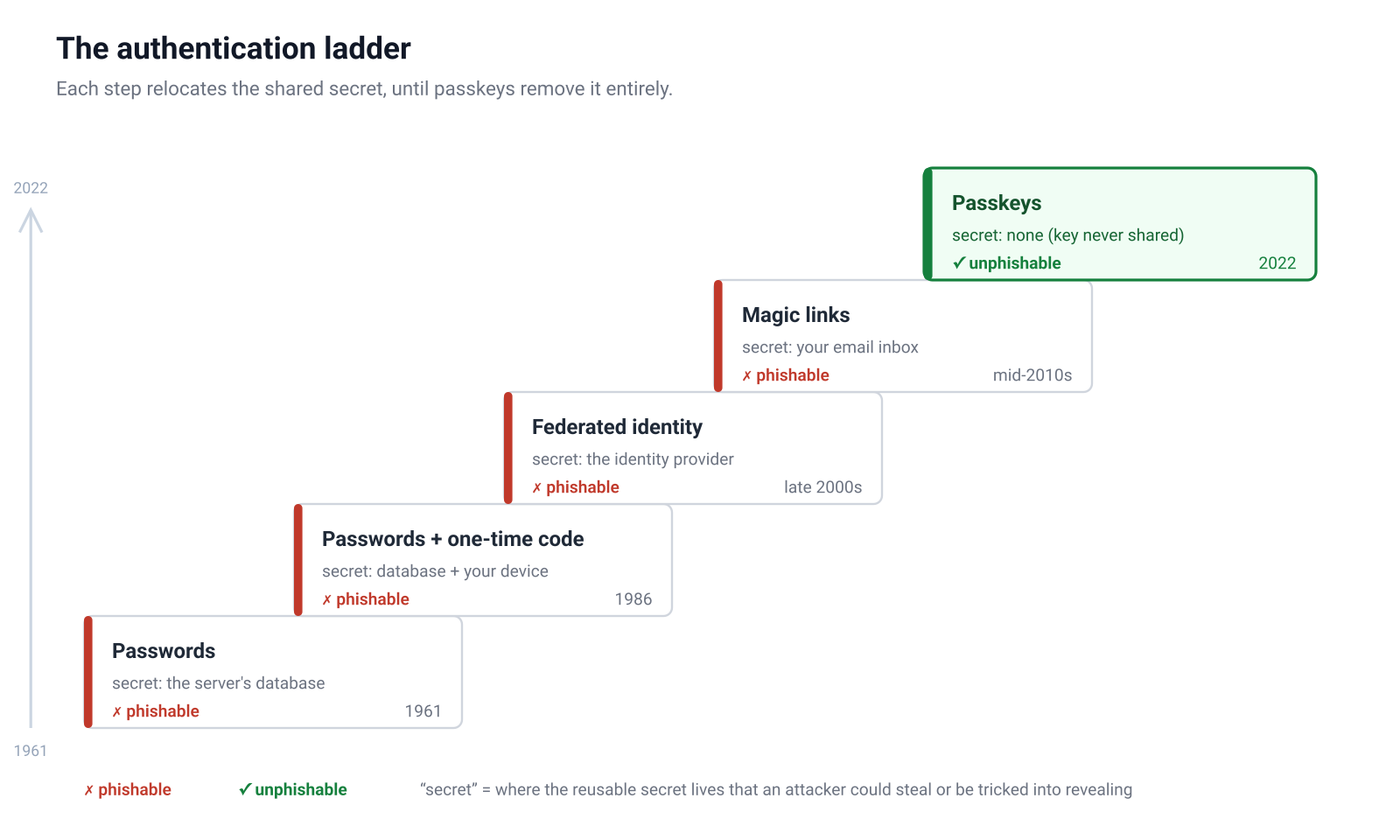
1961: Passwords alone
A single shared secret, an idea that goes back to MIT’s CTSS in 19611. If it’s guessed, reused, or phished, the account is gone. Every other step exists because this one leaks.
1986: Passwords plus a one-time code
Hardware tokens such as RSA’s SecurID landed in 19862, and TOTP apps3 and SMS codes4 later carried the idea into everyday use, adding a second factor: something you have, on top of something you know. This genuinely raises the cost of an attack, yet it doesn’t close the most common door. A user who can be tricked into typing their password into a lookalike site can just as easily be tricked into typing the six-digit code straight after it. The phishing page simply relays both to the real site in real time. SMS adds its own weakness on top, since numbers can be ported away from their owner.
Late 2000s: Federated identity
The “Sign in with Google” button lets users authenticate through a provider such as Google, Apple, or GitHub, which genuinely removes the password from your application: you never store one and never check one, because you delegate the whole question to an identity provider. Strictly this is OpenID Connect5, the authentication layer built on top of OAuth 2.06, the framework finalised in 2012, even though almost everyone calls the bundle OAuth. The catch is that it removes the password from your app without removing the shared secret from the system: it centralises it. The user still proves themselves to the provider, and usually still does so with a password, so the phishing target moves to the provider’s login page rather than disappearing. Every account a user federates then rests on the security of that one provider account, the provider gets to see everywhere its users sign in, and it becomes a single point of lockout.
Mid-2010s: Magic links
Popularised by the SaaS boom of the mid-2010s, sending a sign-in link by email removes the password from the user’s head, which is a real improvement, but it makes the same move as federated identity, relocating the secret rather than removing it. The link is now a bearer token sitting in an inbox, and that inbox is itself usually protected by a password. It’s also exposed on the way there: the link crosses mail servers and relays you don’t control, over connections where TLS (the encryption that protects data in transit, the “S” in HTTPS) is only opportunistic between mail servers and can be stripped, so a token that grants account access spends its first moments on infrastructure outside anyone’s security guarantees. The security of the account collapses back onto the security of the mailbox.
2022: Passkeys
Instead of proving you know a secret, you prove you hold a private key, and you never reveal that key to anyone. The server keeps only the matching public half. There’s nothing in the database for an attacker to steal and replay, and, as we’ll see, the browser refuses to use the key on the wrong site, so phishing stops working by design.
Two patterns show up at every step of the authentication ladder:
- The first is phishability: almost every step except the last can be defeated by a user who is fooled into cooperating with the attacker, and passkeys are the first step where cooperation isn’t enough, because the user is no longer the one checking that the site is genuine.
- The second is more fundamental: every step except passkeys keeps a shared secret somewhere, whether in the user’s head, in an inbox, or in a provider’s database, and the entire history of the ladder is really the story of moving that secret to ever better-defended locations.
Federated identity is the high point of that strategy rather than an exception to it: it doesn’t abolish the secret, it hands it to a provider who can guard it better than you can. Passkeys are the first widely deployed step that stops there being a shared secret to move at all.
What a passkey actually is
Strip away the branding and a passkey is a public/private key pair created for one website.
When you register, your device generates a fresh key pair. The private key is written into a protected store: the secure enclave on a phone, a TPM on a laptop, or the chip inside a hardware security key. It’s designed never to leave that store in usable form. The public key, which is useless on its own, is sent to the website and saved against your account.
From then on, signing in means the website sends a random challenge, your device signs it with the private key, and the website checks the signature against the public key it stored. Possession of the private key is proven without the key ever crossing the wire.
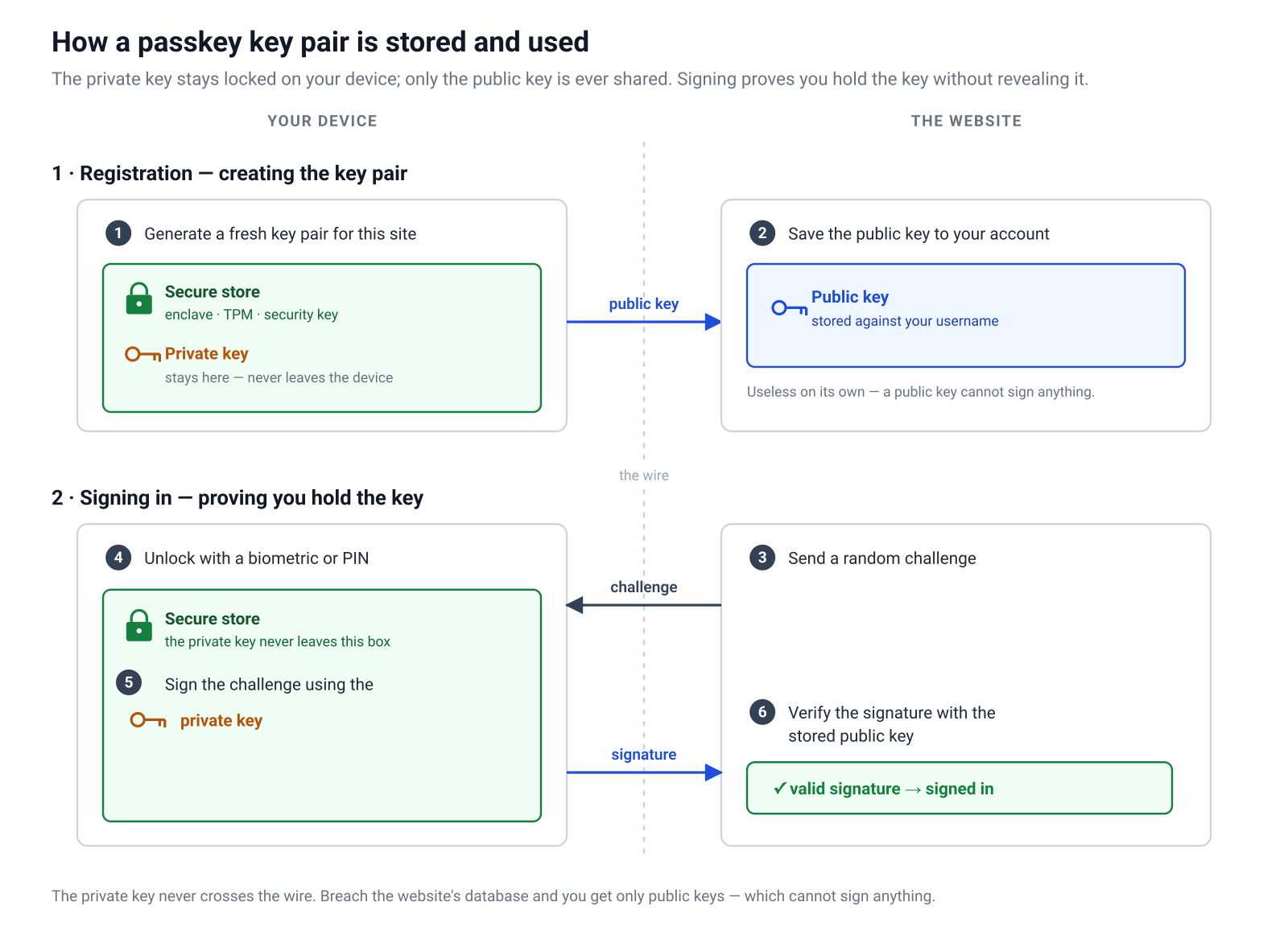
Two consequences fall straight out of this design, and they’re the whole reason passkeys matter:
-
The first is that a database breach stops being catastrophic for authentication. A stolen password table is a list of secrets that unlock accounts, often reusable on other sites because people repeat passwords. A stolen passkey table is a list of public keys, and a public key can’t sign anything. There’s nothing there to replay.
-
The second is that a single passkey gesture is already multi-factor. To use the private key, the authenticator first checks the user with a biometric or a PIN. That combines something you have, the device holding the key, with something you are or something you know, the gesture that unlocks it. The clumsy “password plus separate app” dance collapses into one fingerprint.
Naming the standards correctly
The terminology around passkeys is a small thicket, and getting it right makes the rest of the field readable.
-
WebAuthn is the browser API. It’s a W3C standard7, exposed in JavaScript as
navigator.credentials. When the code below callsnavigator.credentials.create()ornavigator.credentials.get(), that’s WebAuthn. -
CTAP, the Client to Authenticator Protocol, is how a client such as a browser talks to a roaming authenticator such as a phone or a security key, typically over USB, NFC, or Bluetooth.
-
FIDO2 is the umbrella term for the two together: WebAuthn plus CTAP. The FIDO Alliance8, working with the W3C, is the body behind the standards.
-
Passkey is the consumer-friendly name for a WebAuthn credential, and in practice it usually means a discoverable one, a distinction we’ll come to shortly. The word was chosen so that nobody has to say “discoverable FIDO2 credential” at a dinner party.
The taxonomy that trips people up
Three distinctions cause most of the confusion when teams first adopt passkeys.
Platform versus roaming authenticators. A platform authenticator is built into the device you’re using: Touch ID on a Mac, Windows Hello, the secure enclave on a phone. A roaming authenticator is a separate object you carry between devices, almost always a hardware security key such as a YubiKey. Your app doesn’t usually need to care which is which, but the choice shapes the user’s recovery story.
You might expect a platform authenticator to trap a passkey on one machine, since the private key is generated inside that device’s secure hardware. In practice it usually doesn’t, because the operating system’s credential manager copies the passkey between all the devices signed into the same account. Create a passkey with Touch ID on a Mac that shares an iCloud account with your iPhone, and iCloud Keychain syncs it to the phone, so you can sign in there without registering separately; Google Password Manager does the same across your Android and Chrome devices. The private key still never leaves secure storage on each device; the credential manager moves an encrypted copy, end-to-end encrypted so Apple or Google can’t read it. Whether a passkey travels this way is the synced versus device-bound distinction, next.
Synced versus device-bound. This is the distinction that made passkeys usable for ordinary people. A device-bound passkey lives and dies on one piece of hardware: lose the device and you lose the key. A synced passkey is backed up and shared across a user’s devices by a credential manager such as iCloud Keychain or Google Password Manager, so a new phone arrives already holding the user’s passkeys. Synced passkeys trade a little theoretical hardware-level assurance for an enormous gain in practicality, and they’re why passkeys finally crossed into the mainstream9. One side effect is that synced passkeys often report a signature counter of zero, a detail that matters when we verify signature counters in part two.
Discoverable versus non-discoverable credentials. A non-discoverable credential, historically called a non-resident key, stores nothing on the authenticator itself. The server has to remind the authenticator which credentials exist by sending a list, which means the user has to identify themselves first, typically by typing a username. A discoverable credential, the resident key, stores enough on the authenticator that it can present the user’s accounts without being told who they are in advance. Discoverable credentials are what make truly usernameless, passwordless sign-in possible: the user lands on the page, taps a button, picks an account, and authenticates. That’s the experience this post builds.
Where your email fits in
Passkeys remove the password, but they don’t remove the need to say who a key belongs to, and this is where the email address quietly re-enters the story. When the server starts registration, the creation options it sends to the browser include a user object with three fields10, and each has a different job:
-
user.idis the user handle: an opaque identifier for the account, generated once by the server, ideally just random bytes. With a discoverable credential the authenticator stores it next to the private key and hands it back during sign-in, and that’s the whole mechanism behind usernameless login: the server learns who is authenticating from the handle the authenticator presents, not from anything the user types. -
user.nameis the human-readable account identifier, and in practice this is almost always the email address, though the spec is just as happy with a username or a phone number: its own examples list all three. Its consumer isn’t your server but the account picker: when a user holds passkeys for more than one account on your site, this is the string the browser shows so they can tell the accounts apart. -
user.displayNameis a friendlier label still, a full name rather than an address, shown alongsideuser.namewhere the interface has room for it.
Three things follow from this split, and each one surprises people the first time.
The email is a label, not a credential. Nothing in either ceremony signs it, checks it, or proves the user controls the inbox behind it. Registering a passkey with user.name set to paul@example.com proves possession of a private key and nothing whatsoever about that mailbox. If your application relies on email for recovery or notifications, verifying ownership is a separate, ordinary application concern, exactly as it was with passwords.
The email must not be the user handle. The WebAuthn specification is explicit that user.id must not contain personally identifying information such as an email or username7. Partly this is privacy: the handle isn’t guarded the way the private key is, so it should be worthless to anyone who reads it. Partly it’s lifecycle: the handle is copied onto authenticators you may never see again, so it has to outlive an email change; an account isn’t the address it was created with. The follow-up post generates it with a one-line helper from the webauthn-ruby gem and stores it as a separate column on the user.
The picker text lives on the authenticator, not on your server. A discoverable credential stores user.name and user.displayName at creation time so the picker can render without asking your server anything. Change the email on the account later and every existing passkey keeps showing the old address; browsers are only now gaining an API that lets a site push updated details back to the credential manager.
And a worry worth defusing: a tampered label can’t cross accounts. If the server never validates the email, could a user change the address on a passkey and sign in to someone else’s account? No, because the label never makes the return journey. The authentication response carries the credential ID, the signature, and the user handle; user.name and user.displayName are write-only, handed to the authenticator at registration for the picker’s benefit and never sent back. Editing the email on a stored passkey changes what your own picker displays and nothing else.
The handle does return, and it’s the field an attacker would want to swap, but a response presenting someone else’s handle fails twice over. The server looks the credential up among that account’s registered credentials, where the attacker’s credential doesn’t appear, and the signature only verifies against the public key stored at registration, which isn’t the attacker’s. The specification makes the first of these an explicit verification step, checking that the user identified by the handle actually owns the credential presented, and the second is the entire point of the design. Where the label genuinely can be abused is before any of this, at account creation: an application that creates accounts from an unverified email lets anyone claim victim@example.com and attach a passkey to it before the victim ever signs up. That’s the classic pre-account-takeover problem, it exists just as much with passwords, and it’s exactly the “separate, ordinary application concern” from a paragraph ago.
There’s a pleasing demotion hiding in all this. On the authentication ladder, the email address had been climbing: magic links made the inbox the place the secret actually lived. With passkeys the email drops off the security path entirely. It’s a caption in a picker and a channel for receipts, and the last home of the shared secret ends up holding no secret at all.
Why passkeys can’t be phished
This is the part worth slowing down on, because it’s where passkeys earn their reputation.
When a credential is created, it’s bound to a Relying Party ID, the RP ID, which is essentially your site’s domain. When the user later tries to authenticate, the browser will only offer credentials whose RP ID matches the origin of the page actually being viewed. A passkey created for pardel.dev is invisible on parde1.dev, and the user is never asked to make that judgement.
That last clause is the crucial one. With passwords, the human is the component checking that the site is genuine, and humans aren’t reliable at spotting a swapped letter in a domain under time pressure. With passkeys, the browser performs the check, mechanically, every time, using the real origin rather than the one the user thinks they’re on. The signed payload that comes back to your server includes the origin the browser saw and the exact challenge you issued, so even a man-in-the-middle relaying messages in real time can’t produce a valid signature for your domain. The thing that defeats classic phishing is moved out of the user’s hands entirely.
The two ceremonies
Everything in WebAuthn reduces to two flows, and they’re pleasingly symmetrical. The specification calls them ceremonies:
-
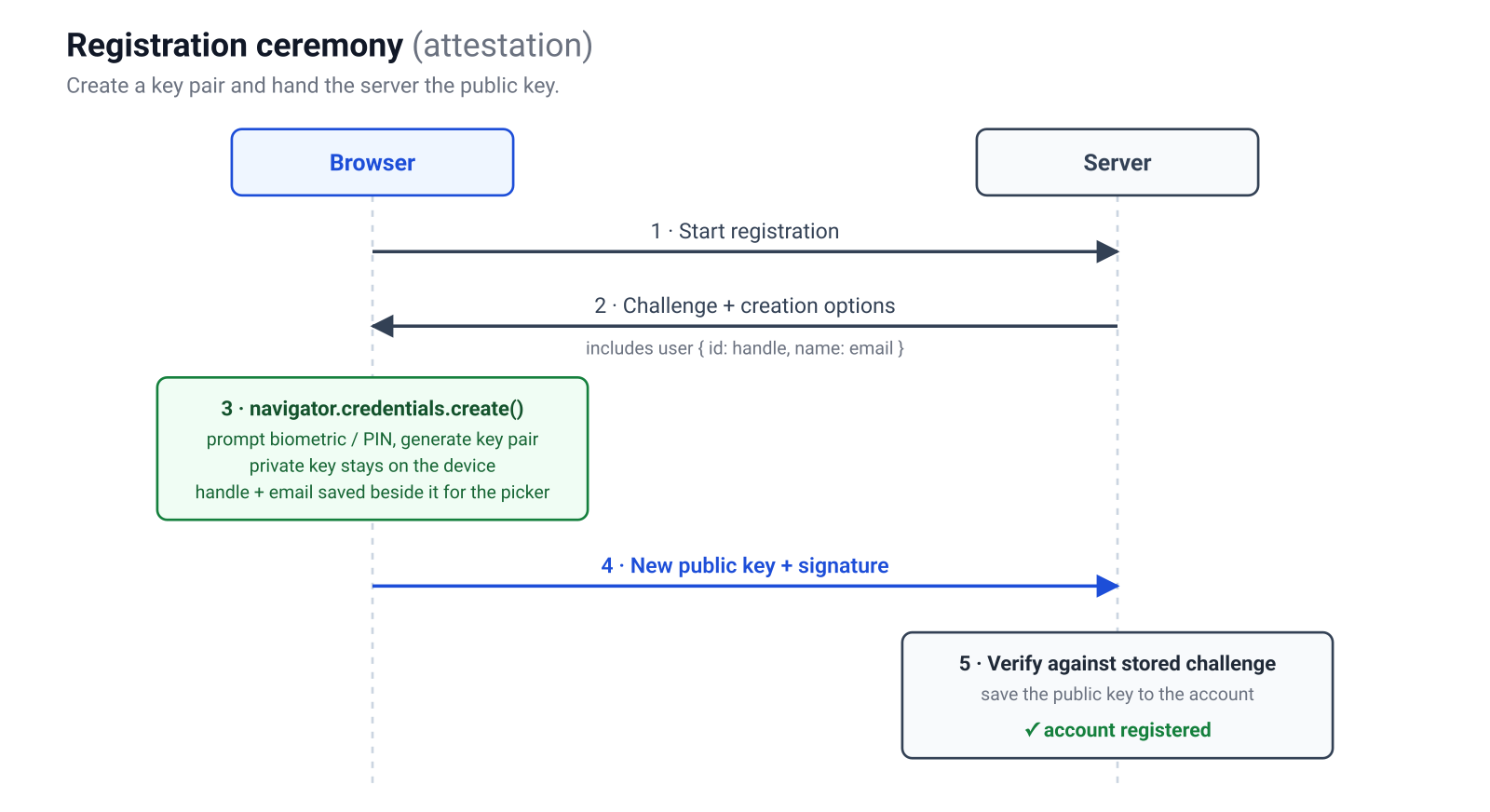
Registration (the attestation ceremony) creates a new key pair and hands the public key to your server.
-
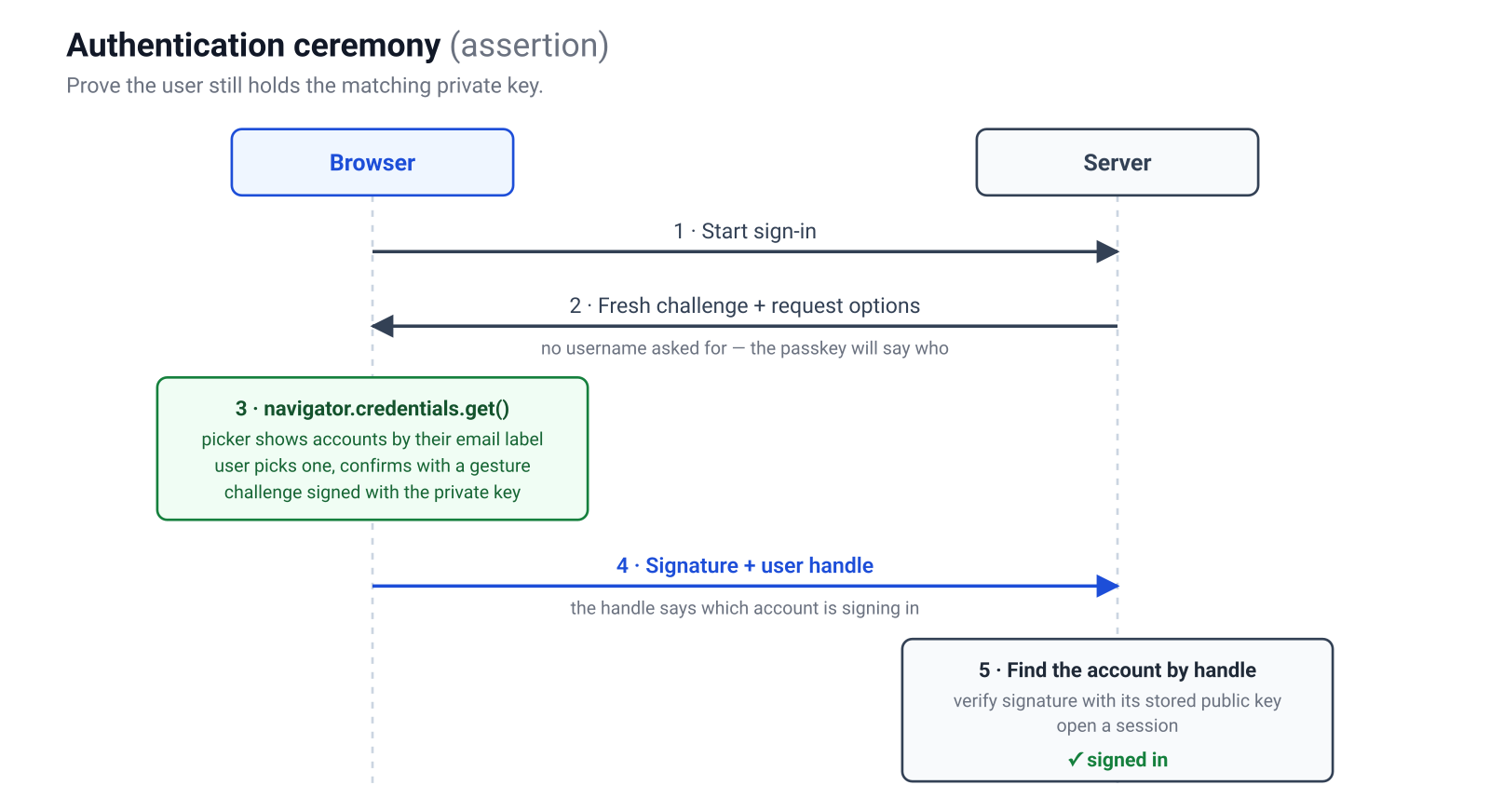
Authentication (the assertion ceremony) proves the user still holds the matching private key.
Both follow the same shape: the server issues a random challenge, the authenticator produces a signature over it, and the server verifies that signature. Hold that round-trip in your head and the code below is mostly plumbing.
Registration
- The browser asks the server to start registration.
- The server generates a random challenge, remembers it, and returns the creation options, including the
userobject: the account’s handle and its email label. - The browser calls
navigator.credentials.create(), which prompts the user for a biometric or PIN and generates the key pair. The authenticator keeps the private key and stores the handle and email beside it, ready for the account picker. - The browser sends the new public key and a signature back to the server.
- The server verifies the response against the stored challenge and saves the public key against the account.
Authentication
- The browser asks the server to start sign-in.
- The server generates a fresh challenge, remembers it, and returns the request options. Nothing in them identifies the user: the passkey is about to say who is signing in.
- The browser calls
navigator.credentials.get(), the user picks a passkey from a list labelled by email, and confirms with a gesture. - The browser sends a signature over the challenge back to the server, along with the user handle.
- The server finds the account by the handle, verifies the signature against its stored public key, and opens a session.
What’s next: building it in Rails
The two ceremonies above are the entire protocol: a challenge out, a signature back, a verification. Everything else is plumbing. In the follow-up post, Building passkeys in Ruby on Rails from scratch, we turn these diagrams into a working passwordless, usernameless login: the server-side options and verification with the webauthn-ruby gem, the browser calls, the parts a from-scratch demo tends to skip, and a small gem that packages the whole thing.
References
- Professor Emeritus Fernando Corbató, MIT computing pioneer, dies at 93, MIT News (the CTSS password, 1961).
- RSA SecurID, RSA (the SecurID one-time-password hardware token).
- RFC 6238: TOTP: Time-Based One-Time Password Algorithm, IETF (2011).
- NIST SP 800-63B: Digital Identity Guidelines — Authentication and Lifecycle Management, NIST (2017; §5.1.3.3 restricts SMS one-time codes).
- OpenID Connect Core 1.0, OpenID Foundation.
- RFC 6749: The OAuth 2.0 Authorization Framework, IETF (2012).
- Web Authentication (WebAuthn) Level 2, W3C Recommendation.
- Passkeys, FIDO Alliance.
- Apple, Google and Microsoft commit to expanded support for FIDO standard, Apple Newsroom, May 2022 (passkeys).
- Web Authentication (WebAuthn) Level 2, §5.4.3: User Account Parameters for Credential Generation, W3C (the
PublicKeyCredentialUserEntitydictionary:id,name, anddisplayName).