GOVERN
Last updated:
Every second-brain system solves capture. Almost none solve trust.
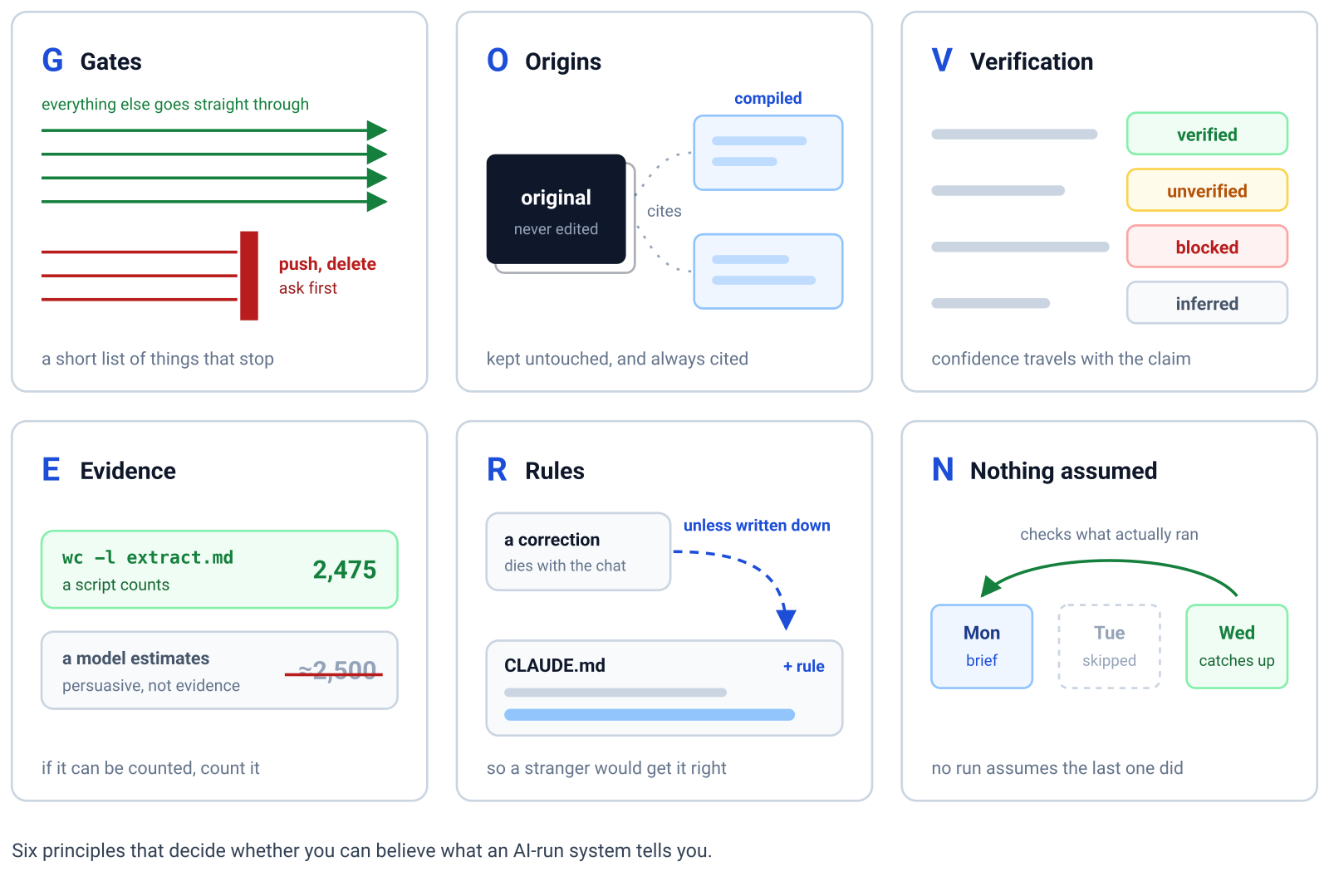
 GOVERN is a framework driven by six principles that decide whether you can believe what an AI-run system tells you.
Below you’ll find the principles, the script and the prompts that put them in place, and an account of what my own knowledge base looks like after nearly five months of daily use. I update it as the system changes, and the date above says when I last did. The script and the prompts are a repo too, at github.com/pardel/govern.
If you’d like to read the story of how it got here, you’ll find it in The Governed Second Brain blog post, written back in July.
GOVERN is an acronym for the six principles that guide trust in an AI-run second brain:
| Principle | Description |
|---|---|
| Gates | Name the actions that can never happen without you (keep the list short) |
| Origins | Originals are archived untouched, and everything compiled from them cites the file it came from |
| Verification | Every claim says how well it was checked: verified, unverified, blocked or inferred |
| Evidence | If it can be counted, count it. An estimate is not evidence |
| Rules | Every correction becomes a rule, written so a stranger would get it right |
| Nothing assumed | No ritual assumes the previous one happened |
1. The six principles
Gates
An assistant that asks before everything gets waved through, and one that asks before nothing will eventually do something you can’t undo. Both end in the same place, with you no longer the judge of what matters.
The gate list stays short for that reason rather than for convenience: it’s a budget, and every line you add spends attention you’ll want for the things that genuinely can’t be reversed. The list also has to live somewhere a prompt can’t override. A gate stated in prose is a wish, and I learned that twice in one week here: a subagent briefed to write nothing wrote anyway, and a rule asserting that a git setting held an action off turned out to be false. The gates that held are the ones the harness enforces by withholding the tool, not the ones that ask the model to refrain.
Origins
Anything compiled can be regenerated and anything original can’t, so the two get opposite treatment. Your trust in a summary can never exceed your certainty about what it summarises, and once the summarised thing is gone, that certainty has nowhere left to come from.
Verification
A claim’s confidence has to travel with the claim itself. The moment a guess and a checked fact read identically on the page, every sentence inherits the credibility of the best one and the reliability of the worst, and the document stops working as evidence for anything.
Evidence
Facts and judgement come from different machinery, and mixing them spends the expensive one on work the cheap one does better. A script that counts is reproducible, while a model that estimates is persuasive, which is the worse failure when what you needed was the count.
Rules
A correction that lives in a conversation dies with that conversation. Written down for a stranger, that same correction becomes a property of the system instead, and the gap between those two outcomes is the difference between building something and repeating yourself.
Nothing assumed
Every ritual has to survive the previous one being skipped, because sooner or later one will be. A system that works only while you’re consistent is measuring your consistency rather than supporting it.
2. Requirements
Three things, and the list is short on purpose.
- A terminal, where
setup.shruns. It needs bash,curlandgit, plus the everydaymkdir,touch,rm,grep,wc,tranddirname. On Windows that means Git Bash, which comes with git, or WSL. Opening a terminal - git, for version control, and the reason a model can be allowed to write without asking. git-scm.com/install
- Claude Code, the assistant that reads the rulebook and runs the prompts. code.claude.com/docs/en/setup
There’s no database, no server, no application and no format that belongs to anyone. Everything is folders and text files, so a knowledge base built this way is still readable with cat on a machine that has never heard of any of the above.
Along the way, new tools will be installed, though none of them is needed on day one. Here’s a list of some of the tools my setup has picked up:
| jq | the deterministic scripts keep their state in JSON |
| cron, launchd or Task Scheduler | whatever runs a job while you’re asleep |
| ripgrep | structured search across note frontmatter, which grep also does, more slowly |
| gh | the GitHub CLI, if you want issues, pull requests and releases pulled into the knowledge base without anyone leaving the terminal |
poppler (pdftotext) |
text extraction from PDFs at ingest |
For example, poppler wasn’t available locally when a PDF report arrived in July, so the ingest couldn’t extract it, and it didn’t guess: it wrote the note anyway, flagged as blocked, with a heading saying what had failed and a body compiled from three public pages about the report rather than from the report itself. It stayed readable like that until I installed poppler, and on 2 August it was recompiled against a 2,475-line extract of the real thing, which corrected a licence the secondary sources had got wrong.
The kit’s scripts were written on macOS and I’ve only run them there. They’re plain bash and nothing in them is meant to be macOS-only, but on Linux, WSL and Git Bash treat them as untested until you’ve seen them work.
3. Where to run
It’s only folders and text files, so it’ll run anywhere. The choices that matter are the volume it sits on and the machine that runs its scheduled work.
Put it on a volume you can carry. Mine lives on a sparse disk image that mounts at a fixed path, which makes the whole knowledge base one file to copy, to back up, or to carry to another machine. The fixed path is the part that pays off later, because the rulebook, the scripts and the scheduled jobs all refer to absolute paths, and a knowledge base that can move house without being rewired is one you’ll still be running next year. Encrypt the image if the notes are personal, and keep the path free of spaces, since some tooling still trips over them.
Run it on something that’s awake when the work is due. My unattended passes are launchd jobs at half past five, one o’clock and six, with a weekly one on Sunday evening. launchd won’t wake a sleeping Mac to make them happen: it runs a missed job at the next wake instead, so on a laptop that slept through the night the morning brief is waiting for you rather than written before you got up. A small always-on machine fixes that and costs you something else, because the knowledge base is then not on the machine you actually read and write on. Pick whichever of those you mind less, rather than discovering it in week three.
Treat the volume as a dependency. Every scheduled job points at an absolute path inside the image, so an unmounted image gives you an absent system rather than a degraded one. Mount it at login if you go this route.
Version control is not a backup. Git protects you from yourself, and will undo an overwrite, a bad recompile or a deletion you regret. It can do nothing about a failed disk, because the history is sitting on that same disk. My own knowledge base has no remote at all, which is a privacy choice I made and a risk I’ve accepted rather than a recommendation. Whichever way you go, go deliberately: either the history lives somewhere else as well, or you have decided the archive is exactly as durable as one volume.
3.1 The volume, on each platform
Every platform has a form of this. I only ran the macOS commands myself; the other two follow the documentation linked beside them.
macOS, a sparsebundle, which takes up only what it holds, so the size is a ceiling rather than an allocation. It mounts at /Volumes/kb:
hdiutil create -size 10g -fs APFS -type SPARSEBUNDLE \
  -encryption AES-256 -stdinpass -volname kb ~/kb.sparsebundle
hdiutil attach ~/kb.sparsebundle
Linux, a LUKS container in a sparse file, which grows as it fills. The last line hands the new filesystem to you, since it starts out belonging to root:
truncate -s 10G ~/kb.img
sudo cryptsetup luksFormat ~/kb.img
sudo cryptsetup open ~/kb.img kb
sudo mkfs.ext4 /dev/mapper/kb
sudo mkdir -p /mnt/kb
sudo mount /dev/mapper/kb /mnt/kb
sudo chown "$USER": /mnt/kb
Windows, an expanding VHDX, in diskpart as administrator:
create vdisk file="C:\kb.vhdx" maximum=10240 type=expandable
select vdisk file="C:\kb.vhdx"
attach vdisk
create partition primary
format fs=ntfs label=kb quick
assign letter=K
The three aren’t equally private. LUKS is encryption, and the macOS image asks for a passphrase because -encryption AES-256 was passed to it. A VHDX is encrypted by nothing in that sequence, so turn BitLocker on for the mounted volume if the notes are personal. Whichever you pick, keep the mount path free of spaces, because some tooling still trips over them.
4. The setup
The deterministic half is a script, and the judgement half is a prompt that asks you the questions no tool should answer for you. Both are in github.com/pardel/govern.
mkdir ~/kb && cd ~/kb && curl -fsSL https://raw.githubusercontent.com/pardel/govern/main/setup.sh | bash
Any empty folder will do in place of ~/kb. The three steps are chained with && on purpose: if the folder can’t be made or entered, the script never runs, rather than running wherever your terminal happened to be.
If you’d rather not pipe a script from the internet, clone the repo and run bash /path/to/govern/setup.sh from the empty folder instead. Run from a clone, it uses the prompts and tools beside it and fetches nothing.
The folders the script creates are PARA, Tiago Forte’s scheme for filing by how actionable a thing is rather than by what subject it belongs to: Projects for efforts with an end state, Areas for ongoing responsibilities that have none, Resources for reference material with no deadline, and Archive for everything retired along with every original, untouched. An inbox sits in front of them, and GOVERN adds one more at the back, 5_System/, because a system needs somewhere to keep its own workings that isn’t mixed in with your content.
If you’d rather see the choices laid out first, the onboarding page walks the same steps in a browser and writes nothing. The script itself, setup.sh, is about two hundred lines and reaches for nothing beyond curl, git and the everyday mkdir, touch, rm, grep, wc, tr and dirname, so read it before you run it. The only files it ever removes are ones it wrote itself: a command it installed under an old name, or a tool whose download failed halfway. It lays out the folders, puts the base under version control from its first commit, and installs the eleven commands. It also copies three tools into 5_System/tools/: status.sh, which writes one HTML page of what you have, schedule.sh, the runner in Running it unattended, and greet.sh, which greets each new session with what’s waiting, overdue or failing. The greeting runs through a Claude Code SessionStart hook, which the script writes to .claude/settings.json only when no settings file exists, so a file of yours is never touched. Nothing is scheduled and nothing starts on its own.
One thing in that script matters more than its line count.
It commits. Git is what makes it reasonable to let a model write into your notes without being asked every time, because every change becomes something you can see, diff and undo. That protection only covers what has been committed, so commit at natural boundaries rather than once a week. It’s also why pushing to a remote sits on the gates list while writing files doesn’t: local history is recoverable, and anything that has left your machine isn’t.
Then start Claude Code in the folder and run /onboard, which asks the five things only you can answer and writes the rulebook around them. Until it has run, the greeting offers to start it on your first message. What it asks, and why nothing is selected for you, is under /onboard below. If you don’t know what to answer when it asks about gates, start with the first four it offers and grow your own list from there.
4.1 Updating an existing base
The same script with --update, run from the base’s folder, refreshes the commands and the tools and touches nothing else: no folders, no git init, never the rulebook. It insists on a clean tree, commits nothing, and leaves a diff for you to read, so a command you had reshaped is one git checkout -- <file> from being yours again. A plain re-run on an existing base refuses, so a stray run in the wrong folder can’t start it over. CHANGELOG.md says what changed and why.
cd ~/kb && curl -fsSL https://raw.githubusercontent.com/pardel/govern/main/setup.sh | bash -s -- --update
5. The commands
The kit installs eleven commands, each a plain-text prompt, one file each in the repo and linked from its entry below. What follows is what each one does and why it’s written the way it is.
/onboard
Run it once, first. It asks you five things before it writes anything, one at a time. Hand it the answers up front instead, as the onboarding page lets you, and it writes the rulebook from those.
First, what to call the assistant, starting with a family of names. Every worker the base ever gets is named from that family, so the names carry a temperament rather than a job title. It offers four families, the Minions, the Greek gods, Toy Story and Super Mario, or you type a family or a name of your own; then it offers three names from the family for itself. The rulebook records the family and the name, the name being the single voice you talk to, and /recruit later draws on the family and reserves the name rather than hiring an orchestrator.
Second, which actions must never happen without your explicit yes. It offers eight to pick from: deleting files, sending emails, publishing anything outside the folder, pushing to GitHub, spending money, sending anything to a client or third party, changing scheduled jobs, and overwriting a remembered fact. Nothing is pre-selected, and it says most people should select the first four and leave one out only if they truly wouldn’t stop for it. What you select, plus anything you add in free text, becomes the gates list, with the rest of the rulebook written around it.
Third, your areas, the things you’re responsible for on an ongoing basis, which become the folders under 2_Areas/. It offers Personal and Work to keep or drop, and takes as many more as you type. The rulebook then carries one rule about them: new areas are proposed in the brief, never created on the way past, and an item that fits none goes to Resources.
Fourth, a line on each area: what belongs there and what good looks like, one area per question with a skip, and a drafted line to accept or edit where the name makes one plain. That line is what lets an inbox item be filed without a question, and what the weekly review later measures the area against; an area without one is marked so, and the first review asks.
Fifth, whether you want the daily brief written before you wake, and at what hour. On a yes it runs schedule.sh install, which on macOS writes the launchd entry with the real paths filled in and loads it, and elsewhere prints the cron line for you to paste. On a not yet, it tells you to run /daily-brief by hand once and come back to Running it unattended.
One rule isn’t on the list because it isn’t a choice. Nothing under 4_Archive/ is ever edited or deleted; that’s the premise the whole framework rests on, and the rulebook writes it as a refusal rather than a gate.
It guards itself. Run it a second time and it shows you the rulebook you already have, gates list included, and asks before replacing anything, because overwriting a grown rulebook throws away every correction that went into it.
Prompt: prompts/onboard.txt.
/process-inbox
The loop you’ll run most. For each thing in 0_Inbox/: move the original unchanged into 4_Archive/YYYY-MM/, classify it, and write a compiled note at the destination that cites the archived file it came from.
It ends by checking its own work: re-reading every file it wrote, confirming each exists and isn’t empty, and confirming every factual claim traces to a line in the original. What it couldn’t verify it says, rather than leaving out.
Every note gets a stable id and one row in 5_System/INDEX.md, the id, the path and the summary on one line, so the base can be searched with grep before any note is opened. The id never changes, which is what lets links survive renames.
Prompt: prompts/process-inbox.txt.
/correction-to-rule
Use it every time the assistant gets something wrong, instead of only fixing the thing. It adds a rule to your rulebook written so that a fresh session with no memory of the conversation would get it right first time.
That “fresh session” clause is doing the work. It forces the rule to be written for a stranger rather than as a note-to-self that only makes sense to whoever was in the room.
It checks two things before it shows you the rule. A rule that says how a tool behaves comes with the command that proves it, because a rulebook that asserts what nobody tested is how the next session inherits the mistake with more confidence than you had. And the wrong fact gets corrected everywhere it was copied, index rows and summaries included, in the same act. The copy least likely to be read in full is the one that reaches an index, and it’s the one that gets quoted next.
Prompt: prompts/correction-to-rule.txt.
/daily-brief
Three sections: what matters today, commitments due, and every source consulted with its status. Point a scheduled job at it and the brief exists before you’re awake, which is the difference between a ritual that survives and a reminder you dismiss. /onboard offers to schedule it at the end of the interview; the runner and the entry it writes are in Running it unattended.
The third section is the one that matters. Each input is marked fetched, stale or unreachable, and a brief without it is broken, so it gets written even on the days when everything worked.
Prompt: prompts/daily-brief.txt.
/refute
Point it at a note and the archived original it cites, and it tries to break the claims rather than confirm them. Self-review catches typos; refutation catches what the first session believed.
It reports what broke and what held, quotes the line that fails to support each broken claim, and says whether to cut it or downgrade it. It is also told that flagging a claim the original supports is a worse failure than missing one, because a checker that flags everything is one you stop reading.
Prompt: prompts/refute.txt.
/lint
Dangling links, notes citing sources that are gone, notes compiled before what they cite last changed, orphaned originals, notes carrying no source at all, claims labelled verified with nothing behind them, and frontmatter a parser can’t read. Answered with grep and the filesystem, because every one of them is countable. The last one is the exception: it needs a parser, because grep still finds the fields in a broken block, and the failure is silent until something parser-driven stops seeing the note.
It fixes only what is mechanical and beyond argument, and reports the rest. A lint pass that quietly rewrites your notes is worse than one that finds nothing.
It also checks the index both ways: rows pointing at a note that’s gone, and notes with no row.
Prompt: prompts/lint.txt.
/recruit
Splits the work across named workers with their own remits. It asks the role, then the name, then the answer that matters most: what this role must never do, which becomes the profile’s “is not permitted” list word for word.
With no roster yet it bootstraps, since a recruiter can’t hire itself: it takes the name family and the orchestrator’s name from the rulebook, and hires the recruiter before the role you actually asked for.
Prompt: prompts/recruit.txt.
/memory-consolidation
Sweeps whatever your assistant carries between sessions for facts that stopped being true, proposes merges for the ones that overlap, and reads back over the changelog for corrections that never became rules.
It proposes and you decide. Adding a memory is routine; removing one waits for your yes.
Prompt: prompts/memory-consolidation.txt.
/daily-brief-grown
Useful later. What /daily-brief turns into after months of use: the deterministic work pushed out to a script, goals cited by name, and escalation written in so that skipping a ritual makes the next one louder rather than resetting the clock.
Assumes a pulse script, a goals file, a commitments register and a changelog. It opens by saying so, and when one of them is missing it says that rather than working around it.
Prompt: prompts/later/daily-brief.txt.
/weekly-review
Useful later. Interactive by design, because an unattended weekly review is the decay the ritual exists to prevent. Every flag it raises gets exactly one of three outcomes and none survives undecided: act, consciously defer, or adjust the threshold that raised it.
That third outcome is the one that matters. A rule that keeps flagging something you keep ignoring is a broken rule rather than a discipline problem.
Prompt: prompts/later/weekly-review.txt.
/retrieval-metrics
Useful later. Runs a fixed set of test queries, resolves every miss by hand, and records the miss rate and the direction it’s moving. One month’s number says little; three months of direction says everything.
It will not rewrite a failing query to make it pass. The query is the measurement, and adjusting it to fit the result is how a metric stops meaning anything.
Prompt: prompts/later/retrieval-metrics.txt.
6. Running it unattended
The kit’s runner, 5_System/tools/schedule.sh, executes one command once when a scheduler asks it to, and /onboard offers to install the schedule at the end of its interview. What follows is what the runner refuses to do, how to tell a quiet run from a dead one, and the scheduler entries by hand.
6.1 What it’s allowed to do while you’re not there
The session gets Read, Glob, Grep, Write and Edit, and Bash is denied by name. That is your gates list enforced at the tool layer rather than asked for politely, and the difference tells at exactly the moment nobody is there to say no: with no shell there’s no push and no delete, so two of the first gates the interview offers, deleting files and pushing to GitHub, are unreachable rather than merely forbidden.
Naming Bash in the deny list is what removes it. An allow list that leaves it out is a set of pre-approvals rather than a fence, and a session given one here still reached for Bash and got it. Widen GOVERN_ALLOW if a grown command needs more, knowing what you’re widening and when.
A run that succeeds commits what it wrote, locally and never pushed, so the writing nobody watched is still writing you can see, diff and undo. If the tree was already dirty it commits nothing and says so, rather than sweeping your work in with its own.
6.2 Telling a quiet run from a dead one
The runner adds two instructions to your prompt. The first says nobody is there to answer, so a run that gets stuck still writes the file it owes, marked status: blocked with what failed, and says in one line if it skipped a check. The second is to print GOVERN_OK at the end, and at no other time. A run that finishes without it is logged as failed, because otherwise a job that stopped firing and a job with nothing to report produce the same empty output, and that’s how a check sits dead for a month with nobody noticing.
A marker is a session reporting on itself, which isn’t evidence anywhere else here, so the log carries a counted number beside it:
2026-08-20 06:04  daily-brief          OK      1 file(s) changed, committed
2026-08-21 06:03  daily-brief          FAILED  finished without printing GOVERN_OK, so it did not reach the end
2026-08-22 06:15  daily-brief          FAILED  no answer within 900s, killed
2026-08-23 06:02  daily-brief          FAILED  killed by a signal before it finished
2026-08-24 06:03  daily-brief          OK      changed nothing
That last-but-one line is a logout, a shutdown or a launchctl bootout landing mid-run. It is the quietest death of the lot, since the run is gone along with the script that was watching it, so the runner writes its own obituary on the way out and takes the session with it rather than leaving it orphaned.
A failure also leaves 5_System/logs/FAILED-<command> on disk, which the next good run deletes, and the status page grows a block for it. Three places, because a failure you have to remember to go looking for is a failure you find in a month.
6.3 The cadence comes from the scheduler
The runner doesn’t know what day it is and never asks. Cadence written as “has it been a day since last time” is arithmetic, and arithmetic that floors elapsed seconds to whole days turns a daily job into an every-other-day job while reporting nothing wrong. My own system shipped that bug. Hand the calendar to launchd or cron, which exist for it, and the runner stays a thing that runs once.
6.4 The scheduler entry
On macOS, schedule.sh install daily-brief 6 writes the launchd entry with the paths and the hour filled in and loads it, and /onboard offers to run it at the end of the interview. schedule.sh print gives the launchd or cron form to paste by hand, and the README’s Running it unattended has both. Windows has neither, and this kit doesn’t pretend otherwise: Task Scheduler will run the same command through whichever bash you have, but I tested none of that.
Three consequences worth knowing before you schedule anything, on top of the volume being a dependency, which section 3 covers:
- Your
claudewon’t be on the job’sPATH. A scheduled job gets/usr/bin:/bin:/usr/sbin:/sbinand nothing more, whileclaudeusually lives somewhere else, and this is the commonest reason a command that works by hand dies on a schedule. The runner looks onPATH, then in~/.local/bin,/opt/homebrew/bin,/usr/local/binand~/.claude/local, and refuses with a plain message when it can’t find one. SetCLAUDE_BINif yours is somewhere else again. A shim that a terminal multiplexer or an IDE puts onPATHunder a temp folder is passed over too, because it dies with the session, andinstallwrites the location it settled on into the entry asCLAUDE_BIN. - A sleeping machine misses its jobs. Neither
cronnorlaunchdwill wake it, and section 3 covers what that means for a laptop. They differ in what happens next:launchdruns a missed job at the next wake, whilecrondoesn’t catch up at all, so a job missed while asleep is skipped until its next time comes round. cronwill start a second copy;launchdwon’t. The runner takes a lock either way, and a run that finds one held is logged as a failure naming the lock, so a wedged job is loud rather than silent.
7. How this runs in practice
The starter kit above is where mine began. What follows is what the same system looks like after nearly five months of daily use, written down so you can see which parts arrived later and decide for yourself which of them you’d want. Every number here was counted off the disk rather than remembered: over 260 compiled notes across Projects, Areas and Resources, about 2,700 preserved originals in the archive, and over 1,350 commits since the first one on 20 April 2026.
7.1 The rulebook, and where it went
CLAUDE.md is about 4,000 words now, and it’s read at the start of every session. It grew past a page months ago, and the moment it started costing real context on every single session, I moved the details down into a manual folder of thirteen reference files, another 18,000 words that get loaded only when the relevant work comes up. Note templates, tag vocabulary, index format, changelog format, provenance rules, the linting catalogue, the checklist for retiring a project: none of that needs to be in memory while the assistant is answering a question about something else.
The split is worth copying, though not on day one. Keep the core rules in the file that always loads, and put the reference material one level down with a pointer to it.
7.2 What a note looks like
Every compiled note carries frontmatter: a stable id, the archived file it came from, the timestamp it was compiled at, a status, tags from a controlled list, and a one-line summary. The id never changes, so links between notes survive renames, retitles and reorganisations.
That frontmatter is what makes the system searchable without a database. A note that draws on several sources, cites external URLs, or makes quantitative claims also gets a provenance sidecar next to it, recording where each claim came from, so an argument can be audited a year later without re-reading everything underneath it.
An index file lists every note with a one-line annotation and stays navigation rather than synthesis, and an archive ledger records what came in, when, and what was done with it.
7.3 The deterministic layer
Nineteen shell scripts in my tools folder, against the three the kit ships, do the work no model should be asked to do: a pulse script that reports what’s stale and what’s due, a lint script that finds broken links and stale compile metadata, a retrieval-metrics script that measures whether the system can still find things, a watcher that notices when a followed URL changes, and a refresher that splices live status into the day’s brief. They return the same answer every run, and their output goes into the documents verbatim.
This is the Evidence principle earning its place. Every one of them exists because the alternative was the assistant estimating something a script could count.
7.4 What runs without anyone present
A scheduled job runs at those three times of day, with a lighter check every half hour, and each run consults a small registry where each recurring pass is a single file declaring what it is and when it’s due. Adding a weekly job means adding a file. When nothing is due, nothing runs and nothing is spent.
Passes that need judgement run through Claude Code in headless mode with an explicit list of tools it may use and the gated actions withheld, so an unattended run can compile, verify and file, and can’t push, delete or overwrite. When a session does start interactively, a hook greets it with anything overdue: an unprocessed inbox, a lint pass due, a ritual that hasn’t run.
Eleven of the recurring procedures are also saved as named commands, so a pass runs the same way whether a person or a schedule invoked it.
7.5 The rituals, and what happens when you skip one
Three rituals carry the load here: a daily brief written before anyone’s awake, a weekly review that needs a person in the room, and a quarterly goals check. The brief plans the day and states its sources. The review looks back over the week, and any brief that was never read gets surfaced there as carried unseen rather than quietly ageing out.
Skipping escalates rather than resets. Miss the weekly review and the daily briefs start leading with that fact. This is Nothing assumed made concrete, and it’s the property that keeps the system honest on the weeks when life gets in the way.
The daily prompt in the starter kit is where this began. What it grew into, with the deterministic work pushed out to a script and the escalation written in, is prompts/later/daily-brief.txt.
The weekly one is the counterpart, and it’s deliberately the opposite kind of ritual: the daily brief exists precisely because nobody has to be there, while the review is worthless without me in the room. Its prompt is prompts/later/weekly-review.txt.
Two details in the weekly one carry more weight than their length suggests. Every flag getting exactly one of three outcomes is what stops a review becoming a list of things noticed and never decided, and “adjust threshold” is the one that matters most, because a rule that keeps flagging something you keep ignoring is a broken rule rather than a discipline problem. The “carried unseen” heading is the same instinct applied to the briefs themselves: a document nobody read is a gap in the record, so it gets surfaced rather than filed as done.
7.6 How work gets checked
Every processing run ends with a self-review: files exist and aren’t empty, links resolve, every external URL was actually fetched in that session, every number traces to a line in a source. Then the adversarial half, which is the part that took longest to learn: on any batch of real size, a separate session is pointed at each new note and asked to refute it against the archived original rather than confirm it. Claims that break get downgraded or cut before anything ships.
Runs that fail write a blocked artefact instead of nothing, saying what broke and what the recovery step is. A workspace changelog records the same story in the long form, as a lab notebook of what was attempted, what failed and what was verified, currently about 60 entries in the live file, with some 480 older ones rotated into quarterly archives.
Maintenance has its own cadence: a lint pass weekly, retrieval quality measured monthly against a fixed set of test queries, and a quarterly sweep over the assistant’s persistent memories to check they’re still true.
7.7 The gates, five months on
My list is still short. Pushing to a remote, deleting anything outside the inbox, overwriting an existing memory, abandoning a plan artefact mid-flight, and the destructive git operations. Everything else happens without asking, including the writing, filing, verification and scheduling described above.
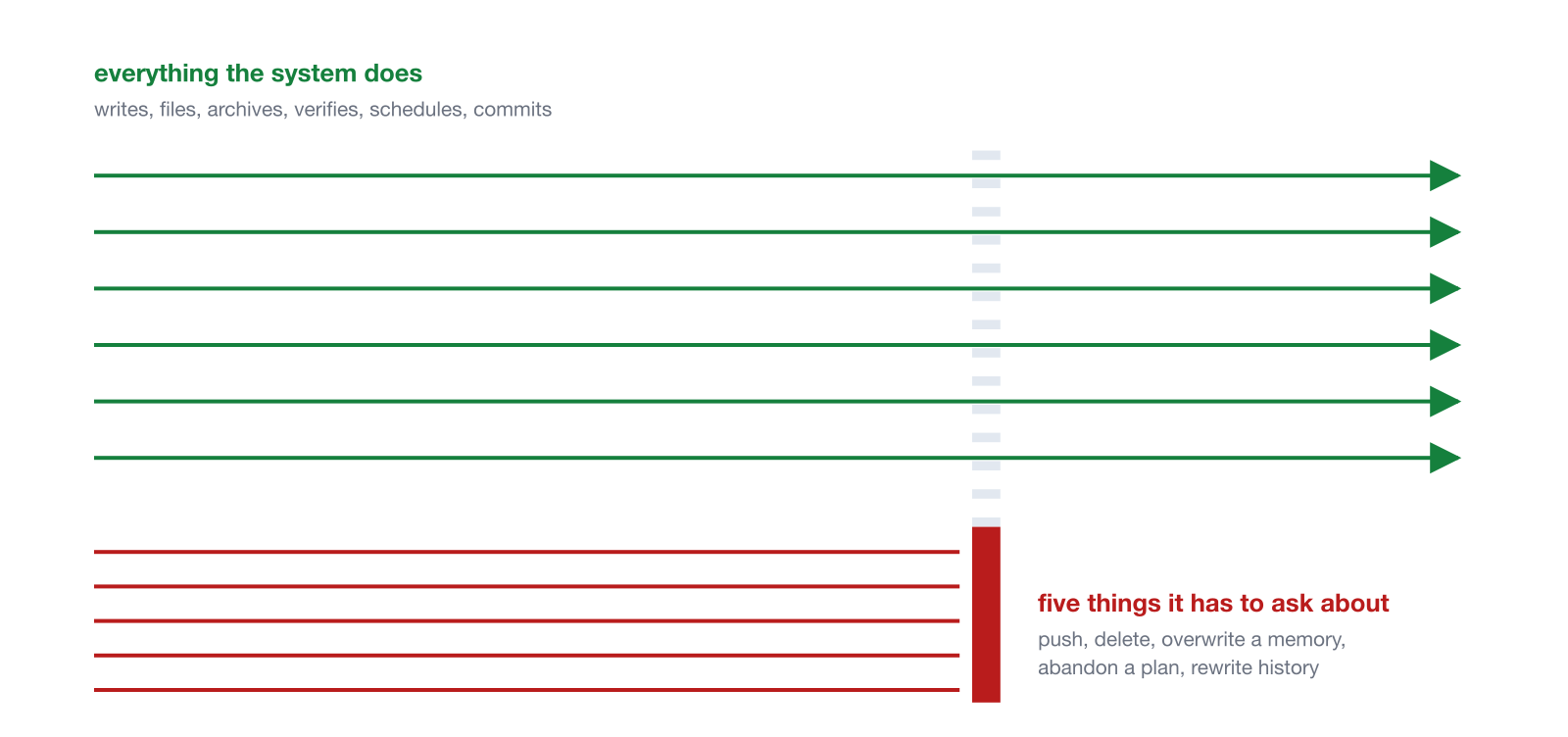
That ratio is the point. A long gate list would mean a permission prompt every few minutes, and permission prompts that arrive every few minutes get approved without reading, which leaves you with a system that feels governed and isn’t.
7.8 The specialists
The work is split across a handful of named specialists with their own profiles and remits, a librarian for the knowledge base, an engineer for code, an editor for long-form writing, and others, and they all report through one voice, Bob’s, so I talk to a single interface rather than a cast.
Here’s my “team” and how the communication flows:
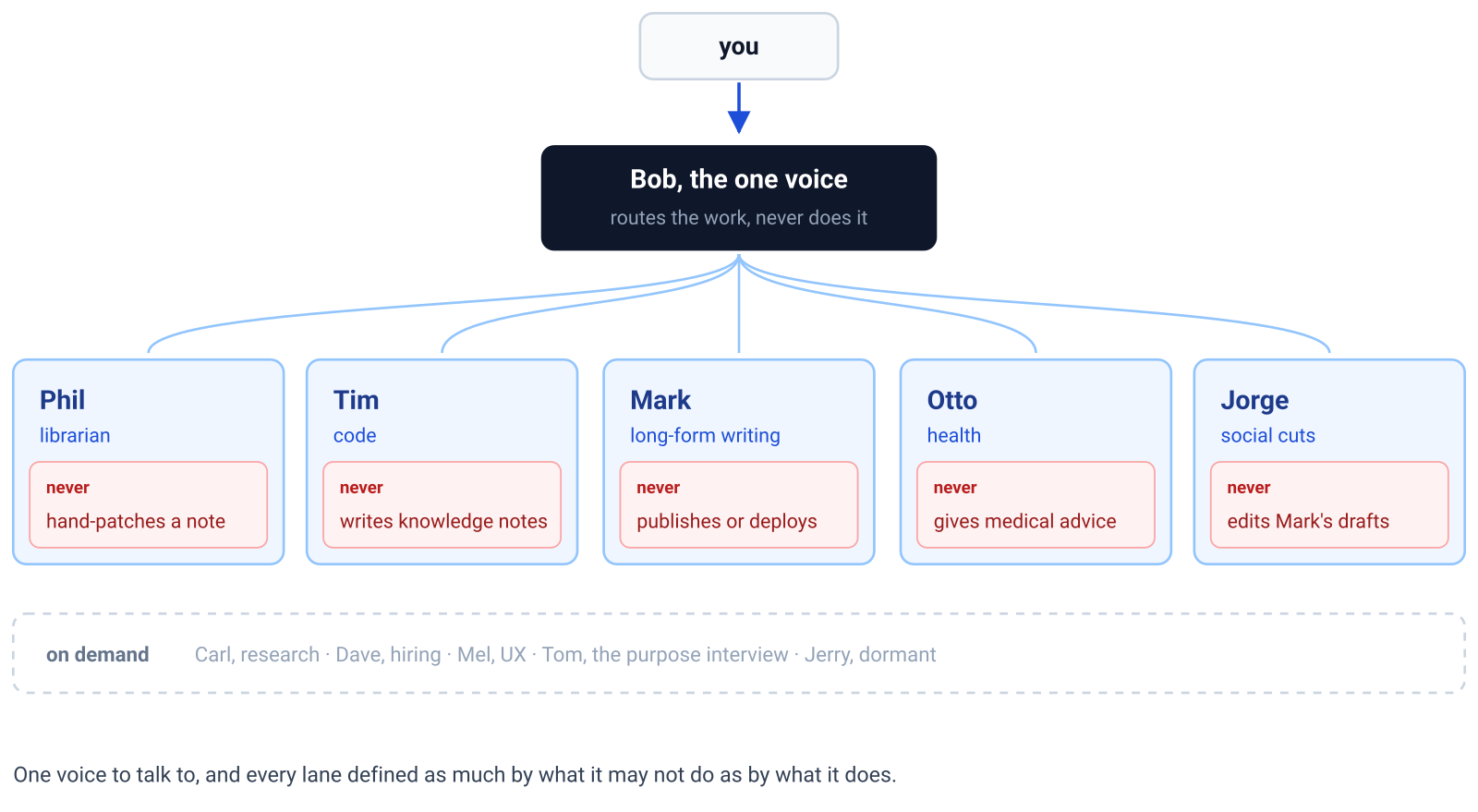
It’s genuinely useful at this size, and it would have been pure overhead in month one. Which is the honest summary of this whole section: the folders, the rulebook and one ritual that runs itself carried the system for months before any of the rest of it existed, and if you build only those, you’ll have something that holds.
8. Conclusion
Capture is the easy part. What GOVERN is about is whether you can believe what an AI-run system tells you, and the six principles are how I answer that:
- Gates keep the few actions you can’t undo with you.
- Origins keep every original, so any note can be checked against where it came from.
- Verification makes every claim say how well it was checked.
- Evidence means counting what can be counted instead of estimating it.
- Rules turn each correction into something the system keeps.
- Nothing assumed means a skipped day doesn’t break the next one.
All you need to get started is to pick an empty folder, run setup.sh, then /onboard, and keep the gates list short. After that it’s three commands: /process-inbox when something arrives, /daily-brief each morning, and /correction-to-rule every time the assistant gets something wrong.
Add the rest the way I did, when something goes wrong rather than because it’s described here. A script when you catch the assistant estimating something it could count, a check when a failure went unnoticed, a new rule when you’ve made the same correction twice.
The kit is at github.com/pardel/govern, and the onboarding page walks the same steps in a browser if you’d rather see the choices first.