Published:
Tagged: Claude-Code AI-Agents Agent-Harness Agentic-Coding Tools
Claude loops
In Opening Pandora’s Box I made the case that the engine inside every AI coding agent is a boring while-loop. This post picks up where that one stopped: once you can read the loop, you can wrap it. Every mechanism for keeping Claude working, from
/goaltocron, is the same loop re-entered by something, and you can work through them all in an afternoon.
When people say “Claude just stops too early” or “I wish it would keep going until the tests pass” or “can it check my PR every ten minutes?”, they are all asking the same question: who restarts the loop?
Out of the box, the answer is you. You type a prompt, Claude runs its loop until it decides it’s done, and then it waits for you again. Every technique in this post replaces you with something else: a condition, a script, a clock, a scheduler. That’s really all there is to it: no new magic at any step, just a new thing holding the restart button.
I’ve ordered these from gentlest to most autonomous, and each ring builds on the one before it. You can stop at any ring and still have something useful.
- Ring 0: the loop you already know
- Ring 1: loop until a condition holds, with /goal
- Ring 2: loop enforced by code, with Stop hooks
- Ring 3: loop on a clock, with /loop
- Ring 4: the loop outside the session, headless and Ralph
- Ring 5: loops nobody starts by hand
- Write your own loop
- Choosing your loop
- References
Ring 0: the loop you already know
Quick recap, because everything below stands on it. An agent harness is a while-loop that calls a model and dispatches tools 1:
while not done:
    reply = model(conversation)

    if reply.wants_tool:
        result = run_tool(reply.tool_call)
        conversation.append(result)
    else:
        done = True
Anthropic describes what happens inside one pass of that loop as three blended phases: gather context (read files, search), take action (edit, run commands), and verify results (run the tests, check the output) 2. The loop turns until the model stops asking for tools, and then Claude Code hands control back to you.
That handing back is the important bit. The inner loop always terminates; the model eventually says “done” whether or not the work actually is. Everything in this post is a way of not taking the model’s word for it.
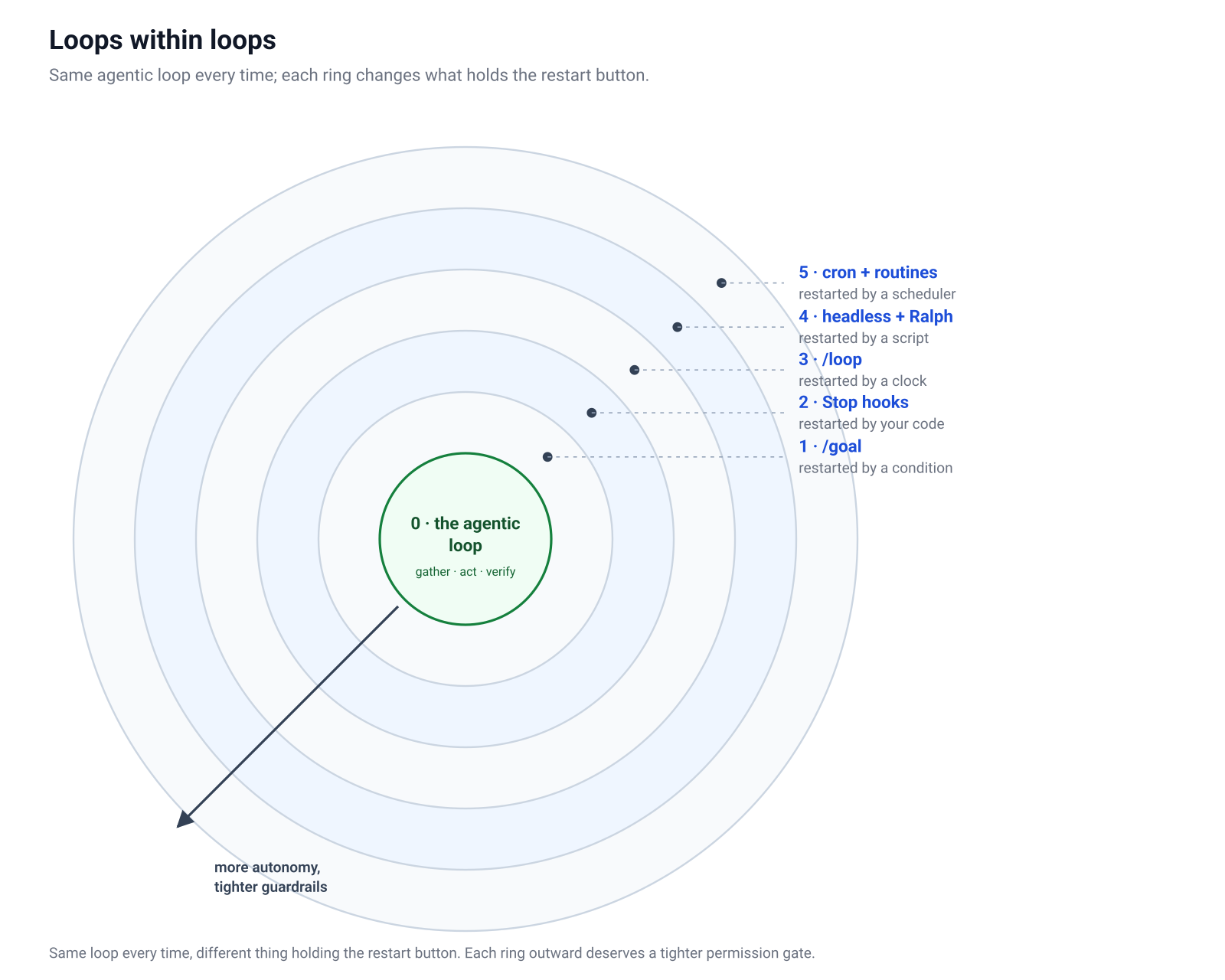
The same rings as a table. Read the last column downwards and you can see the single thing each ring adds over the one before it, which is also what separates it from the one after:
| Ring | Autonomy & guardrails | What changes at this ring |
|---|---|---|
| 0 · the agentic loop | Autonomy: one turn; you restart it every time Guardrails: permission prompts, you watching every step |
the baseline: the model works, you hold the restart button |
1 · /goal |
Autonomy: keeps taking turns until a condition holds Guardrails: measurable condition, turn bound, evaluator check each turn |
a condition replaces you, but its verdict is a model’s judgement |
| 2 · Stop hooks | Autonomy: same session, but it can’t stop while your check fails Guardrails: your script’s exit code, the 8-block cap |
the verdict moves from a model’s judgement to code you wrote |
3 · /loop |
Autonomy: recurs with no end condition at all, while the session is open Guardrails: session-scoped, 7-day expiry, Escape kills it |
time replaces conditions: the loop no longer ends when the work does |
| 4 · headless + Ralph | Autonomy: full runs with nobody present, fresh context each attempt Guardrails: sandbox or worktree, --allowedTools, iteration caps, a DONE sentinel |
the loop leaves the session; your shell and filesystem replace the conversation |
| 5 · cron + routines | Autonomy: nobody even starts it; a schedule or an event does Guardrails: permissions granted entirely up front, run caps, logs as the audit trail |
you are removed from the start button too; only the setup was ever yours |
One note before we head outward. Each ring hands more of the restart decision to software, which means each ring also deserves more care about permissions and exit conditions. I’ll flag those as we go, and the last section collects them in one place.
Ring 1: loop until a condition holds, with /goal
The gentlest upgrade is to stop telling Claude what to do and start telling it when it’s allowed to stop. That’s /goal 3:
/goal all tests in test/auth pass and lint is clean
From that moment, the session has a completion condition. Every time Claude finishes a turn, a small fast model (Haiku by default) evaluates the condition against what actually happened. If it holds, the goal clears and is recorded as achieved. If it doesn’t, Claude gets told why and starts another turn. You didn’t write a loop; you declared an exit condition and the harness loops for you.
The skill here is writing conditions like assertions, not like wishes.
A goal is a predicate that a small model has to evaluate, so give it something checkable:
# good: one measurable end state, with a bound
/goal npm test exits 0 and git status is clean, or stop after 20 turns

# good: a countable condition plus a constraint
/goal CHANGELOG.md has an entry for every PR merged this week, and no other file is modified

# bad: unfalsifiable, the evaluator can only shrug
/goal make the code better
The rules that have served me well: state one measurable end state (a test result, an exit code, a file count), phrase it as a check (“npm test exits 0”, “git status is clean”), add constraints for the things Claude must not do, and bound the loop (“or stop after 20 turns”) so a stuck goal can’t run forever.
Two properties make /goal more useful than it first looks. It survives the session: a goal still active when you close the terminal is restored on --resume or --continue, with the turn count reset but the condition intact. And it works headless, here with a repetition guard in the condition because a flaky test can pass once by luck:
claude -p "/goal the flaky test in spec/jobs is fixed and passes 5 runs in a row"
That single command runs the entire loop to completion with nobody watching, which is your first taste of the outer rings.
One limitation to be aware of: the evaluator is a model. It’s good at “did the tests pass”, but a confident enough transcript can sometimes convince it. When the exit condition really matters, you want the next ring.
Ring 2: loop enforced by code, with Stop hooks
/goal is a condition the model system evaluates. A Stop hook is a condition your code evaluates, and this distinction is the same one I made in the Pandora post about AGENTS.md versus hooks: instructions can be ignored, hooks cannot 4.
A Stop hook fires every time Claude is about to end its turn. Your script runs, looks at the world, and returns a verdict: exit code 0 lets Claude stop; exit code 2 blocks the stop and feeds whatever you wrote to stderr back to Claude as the reason to keep going.
Wire it up in .claude/settings.json:
{
  "hooks": {
    "Stop": [
      {
        "hooks": [
          {
            "type": "command",
            "command": ".claude/hooks/no-stopping-while-red.sh"
          }
        ]
      }
    ]
  }
}
And the hook itself is any script you like:
#!/bin/bash
# .claude/hooks/no-stopping-while-red.sh

if npm test --silent > /dev/null 2>&1; then
  exit 0   # tests green: Claude may stop
fi

echo "The test suite is still failing. Run npm test, read the first failure, and fix it before stopping." >&2
exit 2     # tests red: block the stop, feed the message back
Now “the tests pass” isn’t a claim Claude makes; it’s a fact your script verified, with a real exit code, before the turn was allowed to end. The model no longer gets a vote on whether it’s finished.
Three things worth knowing before you deploy one:
- There’s a cap. A Stop hook can block at most 8 times in a row before Claude Code overrides it, precisely so a broken hook can’t trap a session forever.
CLAUDE_CODE_STOP_HOOK_BLOCK_CAPraises it if you genuinely need more. - There are two softer variants. Besides
"type": "command"there are"type": "prompt"(a single LLM call that returns{"ok": false, "reason": "..."}) and"type": "agent"(a small subagent with tool access that can go investigate before deciding). Command hooks are deterministic; the other two trade determinism for judgement. - It doesn’t fire on Escape. If you interrupt Claude yourself, the hook isn’t consulted. The loop serves you, not the other way round.
Rings 1 and 2 work well together: /goal gives the session direction, the Stop hook gives it a hard floor. I run exactly this pair when I want to walk away from a refactor.
Ring 3: loop on a clock, with /loop
The first two rings loop until something, this ring loops every something: /loop runs a prompt on a schedule for as long as the session stays open 5:
/loop 5m check whether the staging deploy finished and tell me the status in one line
Every five minutes, that prompt fires as a new turn. Intervals take s, m, h, and d (seconds round up to a minute). The prompt is ordinary prompt text, so anything you’d type, including slash commands, can recur:
/loop 15m /my-pr-babysitter
Two variants make it more than a simple timer.
Dynamic pacing
Omit the interval and Claude chooses its own, between one minute and one hour, based on what it’s watching:
/loop check CI on the open PR and address any new review comments
While CI is still running it checks rarely; when things get busy it checks more often. You’ve delegated not just the task but also the timing.
The bare loop
Plain /loop with no arguments runs a built-in maintenance prompt: continue unfinished work, tend to the PR (review comments, failing CI, merge conflicts), do small cleanups, and explicitly take no new initiatives beyond what the conversation already scoped. Think of it as light housekeeping for a session you keep open. And you can replace that default by dropping a loop.md in .claude/ (per project) or ~/.claude/ (per user):
Check the `release/next` PR. If CI is red, pull the failing job log,
diagnose, and push a minimal fix. If new review comments arrived,
address each one. If everything is green and quiet, say so in one line.
The operational fine print matters more here than in the earlier rings, because a clock won’t stop on its own. Loop tasks expire 7 days after creation. If a tick comes due while Claude is mid-task, there’s no catch-up queue; it fires once when the session goes idle. Ticks carry jitter (up to 30 minutes on long intervals, half the interval on short ones), so don’t build anything that needs precise timing. And Escape stops the loop dead.
Notice what changed at this ring:
For the first time, the loop doesn’t end when the work does.
That’s the property the remaining rings build on.
Ring 4: the loop outside the session, headless and Ralph
Everything so far lives inside an interactive session. The next step out is realising that a Claude Code run is just a command:
claude -p "Fix the failing test in test/auth_test.rb and run the suite" \
  --allowedTools "Read,Edit,Bash"
-pis print mode: non-interactive, runs the full agentic loop, prints the result, exits 6.--allowedToolspre-approves the tools you name so nothing blocks on a permission prompt nobody is there to answer.- Add
--output-format jsonand you get structured output with the session id, the result, and the token cost, which makes runs scriptable:
result=$(claude -p "Summarise yesterday's commits" --output-format json)
echo "$result" | jq -r '.result'
And once Claude is a command, a shell loop can hold the restart button. Which brings us to a pattern the community has settled on, usually credited to Geoff Huntley: the Ralph loop 7. To be clear: this is community practice, not an official Anthropic feature. And it’s surprisingly simple:
while :; do
  cat PROMPT.md | claude -p --dangerously-skip-permissions
done
That’s the whole thing. PROMPT.md describes the mission, the loop restarts Claude forever, and each iteration starts with a completely fresh context window.
The fresh context isn’t a bug to be worked around; it’s the entire trick.
A long-running session accumulates noise, half-remembered dead ends, and stale assumptions, and its quality degrades as the context fills. The Ralph loop throws all of that away every iteration and forces the state somewhere durable: the filesystem is the memory. The code so far, the git history, a progress file the prompt tells Claude to maintain. Each iteration reads the current state of the world, does one slice of work, records what it learned, and dies. The next iteration picks up from artefacts, not from a conversation.
Which means most of the work goes into PROMPT.md. A workable one names the mission, tells Claude to check progress notes and pick the next undone piece, insists on running the tests, and defines an end state:
You are building the CSV import feature described in SPEC.md.

1. Read PROGRESS.md to see what is already done.
2. Pick the single next unfinished item. Implement it.
3. Run the full test suite. Fix what you broke.
4. Update PROGRESS.md and commit with a clear message.

If everything in SPEC.md is implemented and the suite is green,
write DONE as the last line of PROGRESS.md and stop.
Then make the shell loop respect that end state, because while : alone never exits:
while ! grep -qx "DONE" PROGRESS.md; do
  cat PROMPT.md | claude -p --dangerously-skip-permissions
done
A word of warning though. That --dangerously-skip-permissions flag is called that for a reason: an unattended loop with no permission gate will happily act on every mistake it makes, at full speed, all night. Run Ralph loops in a container or a throwaway worktree, on a branch, with nothing in reach you aren’t prepared to lose, and put a cost ceiling on it (a sleep between iterations and a maximum iteration count go a long way). People really do let these run overnight and wake up to a finished feature. Others wake up to forty iterations of Claude rewriting the same broken migration. The difference is almost always the quality of the exit condition and of the tests.
There’s also a ralph-loop plugin that packages the pattern as /ralph-loop and /cancel-ralph commands inside a session, if you’d rather not hand-roll the bash. The mechanics underneath are the same idea.
Ring 5: loops nobody starts by hand
Every ring so far began with you typing something. The outermost ring removes that too: the loop is started by a scheduler, on a machine, possibly while you’re asleep.
The classic route is OS cron plus headless mode, and it composes everything from Ring 4:
# crontab: weekday mornings at 9, triage new issues
0 9 * * 1-5 cd ~/code/myapp && claude -p "Read the newly opened GitHub issues, label them, and draft a one-line triage note for each" --allowedTools "Read,Bash(gh:*)" >> ~/logs/claude-triage.log 2>&1
Nothing new to learn: cron holds the restart button, headless mode runs the loop, the log file is your audit trail.
The managed route is Claude Routines 8: Claude Code sessions that Anthropic runs for you on a schedule, on an API call, or on a GitHub event. You define them at claude.ai/code/routines or straight from a session:
/schedule daily PR review at 9am
/schedule tomorrow at 9am, summarise yesterday's PRs
/schedule in 2 weeks, open a cleanup PR for the deprecated feature flags
Each run clones your repos fresh, applies the environment you configured (network access, env vars, a setup script), and runs autonomously with the permissions you granted up front; there’s no approval prompt because there’s nobody there to approve it. Beyond the clock there are two more trigger types: an API endpoint you can POST to (pipe a Sentry alert into a routine and it investigates with the alert text as context) and GitHub events (every PR opened by a particular bot gets its own review session). Routines are a research-preview feature at the time of writing, so expect some changes.
Desktop scheduled tasks sit between the two: scheduled like routines, but running locally on your machine with access to your local files.
Choosing between the in-session loop and these is mostly a matter of answering three questions: does it need my machine’s files, does it need to survive my laptop lid closing, and how often does it need to run?
/loop |
Claude Routines | Desktop tasks | |
|---|---|---|---|
| Runs on | your machine | Anthropic’s cloud | your machine |
| Needs a session open | yes | no | no |
| Survives restarts | 7 days | yes | yes |
| Local file access | yes | no, fresh clone | yes |
| Minimum interval | 1 minute | 1 hour | 1 minute |
Write your own loop
The last stop isn’t another ring outward; it’s owning the loop itself, which closes the circle back to where the Pandora post ended. The Claude Agent SDK is the loop from Claude Code, extracted as a library 9. One function, query(), runs the whole gather-act-verify cycle with the built-in tools:
import { query } from "@anthropic-ai/claude-agent-sdk";

for await (const message of query({
  prompt: "Find and fix the bug in auth.ts",
  options: { allowedTools: ["Read", "Edit", "Bash"], maxTurns: 20 }
})) {
  console.log(message);
}
import asyncio
from claude_agent_sdk import query, ClaudeAgentOptions

async def main():
    async for message in query(
        prompt="Find and fix the bug in auth.py",
        options=ClaudeAgentOptions(allowed_tools=["Read", "Edit", "Bash"]),
    ):
        print(message)

asyncio.run(main())
The mechanics are exactly the while-loop from the top of this post, run for you: the SDK sends the prompt, executes any tool Claude calls, feeds the result back, and repeats until Claude stops calling tools or maxTurns runs out. You get the same levers as the harness (permission modes, hooks including Stop, subagents, MCP servers, session resume) as options on a function call, which means every ring in this post can be rebuilt inside your own product.
One level lower still, the Claude API’s tool runner (client.beta.messages.tool_runner) runs the same loop over your own tools, defined as decorated functions, with max_iterations as the bound 10. No built-in file tools, no harness, just the loop and whatever tools you hand it. That’s the right choice when the agent is a feature of your application rather than a coding assistant.
Choosing your loop
With all six rings on the table, the decision is compact. Ask what should hold the restart button:
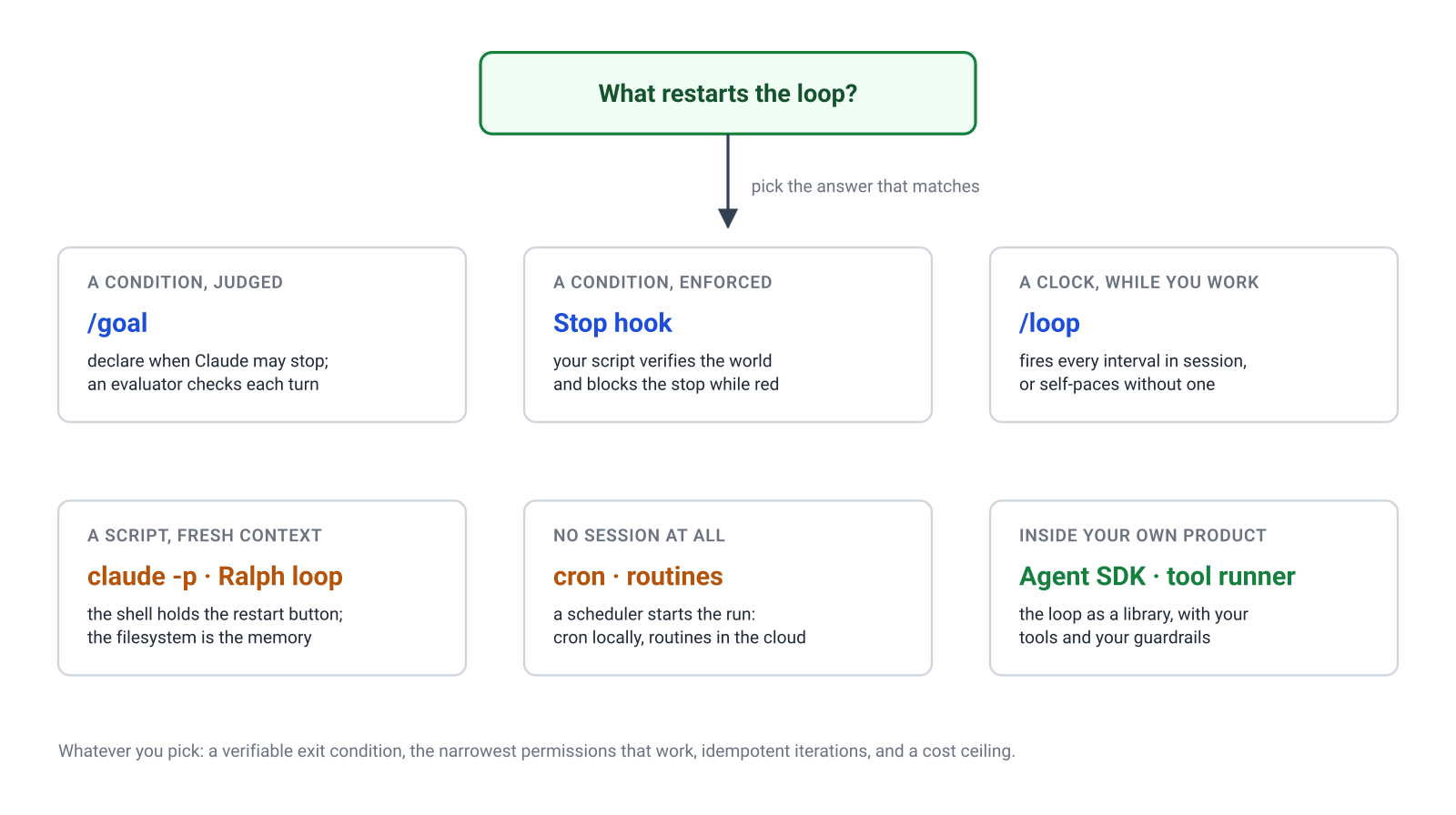
- A condition, judged:
/goal. Start here; it covers more than you’d expect. - A condition, enforced: a Stop hook, usually alongside a
/goal. - A clock, while you work:
/loop, fixed interval or self-paced. - A script, fresh context each attempt: headless
claude -p, growing into a Ralph loop for big unattended missions. - A scheduler, no session at all: cron locally, routines in the cloud.
- Your own product: the Agent SDK, or the tool runner if the tools are all yours.
And the discipline that keeps every one of them safe is the same four rules:
- Every loop needs a verifiable exit condition. A test that passes, a file that says DONE, a bounded turn count. A loop whose exit depends on the model’s self-assessment is a loop that exits early or never.
- Scope permissions to the loop, not to your convenience.
--allowedToolswith the narrowest list that works;--dangerously-skip-permissionsonly inside a sandbox, a container, or a worktree with nothing valuable in reach. The more autonomous the ring, the tighter the gate should be. - Make iterations idempotent. Any loop will eventually run twice over the same state; a well-shaped iteration reads the world, notices the work is done, and exits cheaply instead of redoing it. Progress files and git history are what make that possible.
- Meter it. Loops spend tokens while you sleep.
--output-format jsonreports cost per run, a max-iteration count caps the damage, and for the scheduled rings your usage dashboard is part of the loop.
And know when not to loop at all. A one-off hard problem is better served by one long attended session than by ten unattended retries, and any task where the interesting decisions need human judgement between steps should stay a conversation. Loops are for work whose definition of done can be written down.
Who restarts the loop? At ring zero it’s you, and at ring five it’s a scheduler on someone else’s machine, but it’s the same seven-line loop all the way out. None of these rings required new theory; each one was one file, one flag, or one crontab line. The autonomy was never in the model. It was always in what you wrap around the loop.
References
- Opening Pandora’s Box: A Developer’s Guide to AI Agents, this blog.
- How Claude Code works, Claude Code Docs.
- Goal, Claude Code Docs.
- Hooks guide, Claude Code Docs.
- Scheduled tasks, Claude Code Docs.
- Headless mode, Claude Code Docs.
- Ralph Wiggum as a software engineer, Geoff Huntley. Community technique, not an official Anthropic feature.
- Routines, Claude Code Docs.
- Agent SDK overview, Claude Code Docs.
- Tool runner, Claude API Docs.